> ## Documentation Index
> Fetch the complete documentation index at: https://docs.stablepayfi.ai/llms.txt
> Use this file to discover all available pages before exploring further.
# Pre-integration Preparation
> Essential information before integrating the StablePay API: API Key acquisition, request signing, Webhook notifications, and security best practices.
This document outlines the preparation required before integrating with the StablePay API, including account and key acquisition, request signature algorithms, Webhook event notification mechanisms, and the request headers required for each endpoint.
## Basic Information
| Field | Value |
| ------------------------------- | -------------------------- |
| Production Environment Base URL | `https://api.stablepay.co` |
| API Prefix | `/api/v1` |
| Protocol | HTTPS |
| Data Format | JSON |
| Character Encoding | UTF-8 |
## Prerequisites
Before beginning integration, please confirm that you have:
1. Registered a StablePay merchant account and completed the qualification review
2. Created a store in the merchant dashboard, selected **API** as the channel type, and awaited review approval
3. Generated and obtained the following in the store's **Key Management** menu:
* **API Key**: Used in the `Authorization` request header to identify the caller
* **Secret Key**: Used to generate request signatures, **please store it securely and never commit it to public code repositories or share it with others**
## Creating an API Store
If your team plans to integrate via the StablePay API, please first visit the [Stores and Developers](https://merchant.stablepay.co/#/merchant/stores) page.
### Step 1: Create an API Store
1. Open the [Stores and Developers](https://merchant.stablepay.co/#/merchant/stores) page.
2. Click **Create Store**.
3. Select **API** as the channel type.
4. Enter the store name and domain according to your actual business information.
5. Submit the creation request and await review by the StablePay operations team.
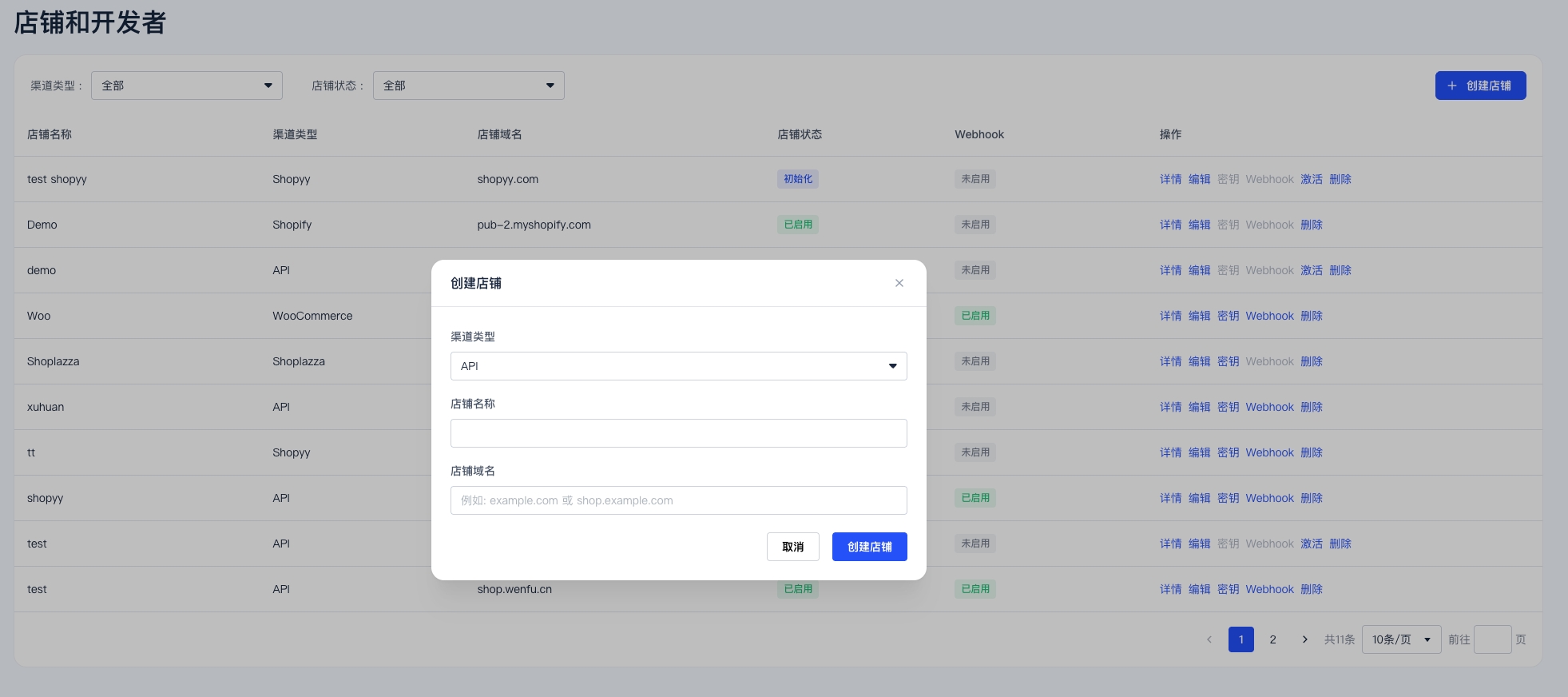
API credentials and Webhook settings are created and managed at the store level. Please confirm you have created the correct store and wait for it to be reviewed and activated before proceeding.
### Step 2: Wait for Store Activation
Once the review is complete, the store status will display as **Activated**. Only after the store is activated can you access the **Keys** and **Webhook** configuration options in the store's action menu.
## Creating an API Key and Secret Key
Once the store status displays as **Activated**:
1. Return to the [Stores and Developers](https://merchant.stablepay.co/#/merchant/stores) page.
2. Open the action menu for the corresponding store.
3. Click **Keys**.
4. Create the **API Key** and **Secret Key**.
5. If the validity period is set to `0 days`, the key will remain valid indefinitely.
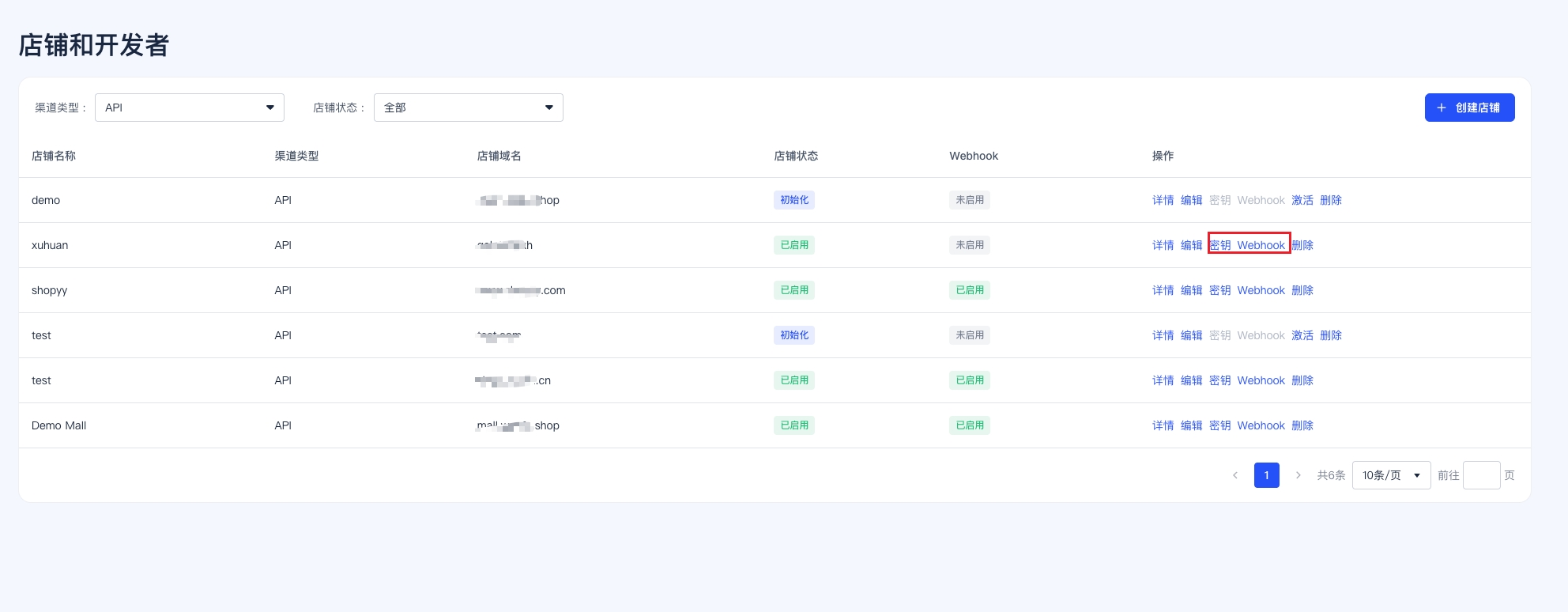
Please copy and securely store the Secret Key immediately after creation. Do not expose it in frontend code, browser storage, screenshots, public repositories, or chat messages.
## Authentication and Signing
### Required Request Headers
All API requests must include the following headers:
| Header | Required | Description |
| ----------------------- | --------------------- | ----------------------------------------------------------------------------------------------------------------------------- |
| `Authorization` | Yes | Format: `Bearer {api_key}` |
| `Content-Type` | Required for POST/PUT | Fixed as `application/json`. Not required for GET requests |
| `X-StablePay-Timestamp` | Yes | Unix timestamp (seconds), must not differ from server time by more than **5 minutes** |
| `X-StablePay-Nonce` | Yes | Random string (**16–64 characters**, UUID v4 recommended), used for replay attack prevention; must be unique for each request |
| `X-StablePay-Signature` | Yes | Lowercase hexadecimal string of the HMAC-SHA256 hash of the signature payload using your Secret Key |
### Signature Payload Construction
```
sign_payload = {timestamp} + "." + {nonce} + "." + {requestBody}
```
* `{requestBody}`: For POST/PUT requests, the **raw JSON string** (do not reserialize or format)
* For GET/DELETE methods with no request body: `{requestBody}` is an **empty string**
* Signature algorithm: `HMAC-SHA256(sign_payload, secret_key)` → lowercase hex string
### Example Code
```bash cURL theme={"system"}
TIMESTAMP=$(date +%s)
NONCE=$(uuidgen)
BODY='{"amount":1999,"currency":"USD"}'
SIGN_PAYLOAD="${TIMESTAMP}.${NONCE}.${BODY}"
SIGNATURE=$(echo -n "${SIGN_PAYLOAD}" | openssl dgst -sha256 -hmac "${SECRET_KEY}" | awk '{print $2}')
curl -X POST https://api.stablepay.co/api/v1/checkout/sessions/create \
-H "Authorization: Bearer ${API_KEY}" \
-H "X-StablePay-Timestamp: ${TIMESTAMP}" \
-H "X-StablePay-Nonce: ${NONCE}" \
-H "X-StablePay-Signature: ${SIGNATURE}" \
-H "Content-Type: application/json" \
-d "${BODY}"
```
```python Python theme={"system"}
import hmac, hashlib, json, time, uuid, requests
API_KEY = "sk_live_xxx"
SECRET_KEY = "your_secret_key"
body = {"amount": 1999, "currency": "USD"}
body_str = json.dumps(body, separators=(",", ":")) # Compact JSON
timestamp = str(int(time.time()))
nonce = str(uuid.uuid4())
sign_payload = f"{timestamp}.{nonce}.{body_str}"
signature = hmac.new(
SECRET_KEY.encode(),
sign_payload.encode(),
hashlib.sha256,
).hexdigest()
resp = requests.post(
"https://api.stablepay.co/api/v1/checkout/sessions/create",
headers={
"Authorization": f"Bearer {API_KEY}",
"X-StablePay-Timestamp": timestamp,
"X-StablePay-Nonce": nonce,
"X-StablePay-Signature": signature,
"Content-Type": "application/json",
},
data=body_str,
)
print(resp.status_code, resp.json())
```
```javascript Node.js theme={"system"}
import crypto from "crypto";
import { randomUUID } from "crypto";
const API_KEY = "sk_live_xxx";
const SECRET_KEY = "your_secret_key";
const body = { amount: 1999, currency: "USD" };
const bodyStr = JSON.stringify(body);
const timestamp = Math.floor(Date.now() / 1000).toString();
const nonce = randomUUID();
const signPayload = `${timestamp}.${nonce}.${bodyStr}`;
const signature = crypto
.createHmac("sha256", SECRET_KEY)
.update(signPayload)
.digest("hex");
const resp = await fetch(
"https://api.stablepay.co/api/v1/checkout/sessions/create",
{
method: "POST",
headers: {
Authorization: `Bearer ${API_KEY}`,
"X-StablePay-Timestamp": timestamp,
"X-StablePay-Nonce": nonce,
"X-StablePay-Signature": signature,
"Content-Type": "application/json",
},
body: bodyStr,
},
);
console.log(resp.status, await resp.json());
```
The `requestBody` in the signature payload **must** be the actual raw bytes sent. Do not format or reorder JSON fields after calculating the signature, otherwise the signature verification will fail.
## Required Headers by Endpoint
| Endpoint Category | Path Example | Authorization | Signature Trio |
| ----------------- | ----------------------------------------------------- | ------------- | -------------- |
| Payments | `POST /api/v1/checkout/sessions/create` | ✅ | ✅ |
| Payments | `GET /api/v1/checkout/sessions/{session_id}` | ✅ | ✅ (empty body) |
| Payments | `POST /api/v1/checkout/sessions/{session_id}/cancel` | ✅ | ✅ |
| Refunds | `POST /api/v1/refunds/create` | ✅ | ✅ |
| Refunds | `GET /api/v1/refunds/{refund_id}` | ✅ | ✅ (empty body) |
| Refunds | `POST /api/v1/refunds/{refund_id}/cancel` | ✅ | ✅ |
| Subscriptions | `POST /api/v1/subscriptions/create` | ✅ | ✅ |
| Subscriptions | `GET /api/v1/subscriptions/{subscription_id}` | ✅ | ✅ (empty body) |
| Subscriptions | `GET /api/v1/subscriptions` | ✅ | ✅ (empty body) |
| Subscriptions | `POST /api/v1/subscriptions/{subscription_id}/cancel` | ✅ | ✅ |
| Invoices | `GET /api/v1/invoices/{invoice_id}` | ✅ | ✅ (empty body) |
| Invoices | `GET /api/v1/invoices` | ✅ | ✅ (empty body) |
| Payment Queries | `GET /api/v1/payment/{payment_id}` | ✅ | ✅ (empty body) |
| Payment Methods | `GET /api/v1/payment_method/{payment_method_id}` | ✅ | ✅ (empty body) |
> `POST /api/v1/subscriptions/create` also requires the `Idempotency-Key` header. When retrying with the same key, the server returns the initially created subscription object.
## Idempotency
The following endpoints support idempotency using merchant-defined IDs as idempotency keys:
| Endpoint | Idempotency Key |
| ------------------- | ------------------------ |
| Create Refund | Request body `refund_id` |
| Create Subscription | Header `Idempotency-Key` |
When submitting with the same idempotency key, the server returns the initially created resource without generating duplicate data.
## Webhook Notifications
StablePay asynchronously pushes key events to your configured callback URL via Webhook.
> If you need to view event examples, risk control freeze status explanations, and handling suggestions for `payment.failed` with `status = "frozen"`, please refer to [Webhook Notifications](/zh/api/webhook-notifications).
### Event Types
| Category | Event Types |
| ------------- | ----------------------------------------------------------------------------------------------------------------------------------------------------------------------------------- |
| Payments | `payment.completed`, `payment.failed`, `payment.expired`, `payment.cancelled` |
| Refunds | `refund.succeeded`, `refund.failed` |
| Subscriptions | `subscription.created`, `subscription.trialing`, `subscription.active`, `subscription.past_due`, `subscription.canceled`, `subscription.updated`, `subscription.incomplete_expired` |
| Invoices | `invoice.created`, `invoice.paid`, `invoice.payment_failed` |
### Webhook Request Headers
| Header | Description |
| ------------------------ | ------------------------------------------------------------------------------------------------ |
| `Content-Type` | Fixed as `application/json` |
| `User-Agent` | `StablePay-Webhook/1.0` |
| `X-StablePay-Signature` | Lowercase hex signature of HMAC-SHA256 on `{timestamp}.{nonce}.{raw_body}` |
| `X-StablePay-Timestamp` | Unix timestamp (seconds) |
| `X-StablePay-Nonce` | Random string (16–64 characters), participates in signature calculation; unique per notification |
| `X-StablePay-Event-Type` | Event type, e.g., `payment.completed` |
| `X-StablePay-Event-ID` | Unique event ID, used for idempotent deduplication |
### Signature Verification Steps
1. Extract `X-StablePay-Signature`, `X-StablePay-Timestamp`, and `X-StablePay-Nonce` from the request headers;
2. Verify that the timestamp is within 5 minutes of the current time (replay prevention)
3. Verify that the Nonce length is between 16 and 64 characters
4. Take the **raw request body bytes** (**do not** parse then reserialize), and concatenate as follows:
```
sign_payload = {timestamp} + "." + {nonce} + "." + {raw_body}
```
5. Calculate HMAC-SHA256 using your Secret Key to obtain a lowercase hex string
6. Compare with the signature in the request header using **constant-time comparison** (e.g., `hmac.compare_digest`)
```python Python theme={"system"}
import hashlib
import hmac
import time
from typing import Mapping
def verify_webhook(
headers: Mapping[str, str],
raw_body: bytes,
secret_key: str,
tolerance_seconds: int = 300,
) -> bool:
"""
Verify StablePay webhook signature.
Signature payload format:
"{timestamp}.{nonce}.{raw_body}"
Notes:
- raw_body must be the original HTTP request body bytes.
- do not parse JSON and serialize it again before verification.
"""
if not secret_key:
return False
timestamp = headers.get("X-StablePay-Timestamp")
nonce = headers.get("X-StablePay-Nonce")
signature = headers.get("X-StablePay-Signature")
if not timestamp or not nonce or not signature:
return False
try:
ts = int(timestamp)
except ValueError:
return False
if abs(int(time.time()) - ts) > tolerance_seconds:
return False
if not (16 <= len(nonce) <= 64):
return False
signed_payload = (
timestamp.encode("utf-8")
+ b"."
+ nonce.encode("utf-8")
+ b"."
+ raw_body
)
expected_signature = hmac.new(
secret_key.encode("utf-8"),
signed_payload,
hashlib.sha256,
).hexdigest()
return hmac.compare_digest(expected_signature, signature)
```
```java Java theme={"system"}
private String computeSignature(String timestamp, String nonce, byte[] rawBody, String secret) {
if (secret == null || secret.isEmpty()) {
throw new IllegalArgumentException("secret is empty");
}
String payload = timestamp + "." + nonce + "." + new String(rawBody, StandardCharsets.UTF_8);
try {
Mac mac = Mac.getInstance("HmacSHA256");
mac.init(new SecretKeySpec(secret.getBytes(StandardCharsets.UTF_8), "HmacSHA256"));
byte[] hashBytes = mac.doFinal(payload.getBytes(StandardCharsets.UTF_8));
return bytesToHex(hashBytes, hashBytes.length).toLowerCase();
} catch (Exception e) {
throw new RuntimeException("compute HMAC failed", e);
}
}
```
### Response Requirements and Retry Strategy
* Your service must return HTTP `2xx` within **30 seconds**
* Returning `429` or `5xx` will enter the **retry queue**; other `4xx` responses will not be retried
* Maximum of **10 retries**, using exponential backoff intervals (minutes): `2, 4, 8, 16, 32, 64, 128, 256, 512, 1024`
### Idempotent Consumption
Please use `X-StablePay-Event-ID` (or the `id` field in the request body) as the idempotency key. Check whether the event has already been processed before handling to avoid side effects from duplicate delivery.
## Error Responses
Errors are returned using HTTP status codes with a JSON response body. The `error` field may be a string or a structured object:
```json theme={"system"}
{
"error": {
"type": "invalid_request_error",
"code": "parameter_missing",
"message": "Missing required parameter: refund_id",
"param": "refund_id",
"doc_url": "https://docs.stablepayfi.ai/errors#parameter_missing"
},
"request_id": "req_xxx",
"timestamp": 1774924800
}
```
Common error codes:
| HTTP | Code | Meaning |
| ---- | --------------------------------------------- | --------------------------------------------------------------------- |
| 400 | `parameter_missing` / `invalid_request_error` | Parameter missing or invalid format |
| 401 | `invalid_api_key` | API Key invalid or signature verification failed |
| 403 | — | No permission to access this resource |
| 404 | `resource_not_found` | Resource does not exist |
| 409 | `conflict` | Idempotency conflict (same idempotency key with different parameters) |
| 429 | `DAILY_REFUND_LIMIT_EXCEEDED` etc. | Rate or quota limit exceeded |
## Security Recommendations
* The Secret Key must only be used server-side and **must not** appear in frontend code, APKs, mini-program packages, or logs
* We recommend injecting the Secret Key via key management services (KMS/Vault/SSM) in your CI/CD pipeline
* Webhook callback URLs must use HTTPS
* For each received Webhook, perform **signature verification + idempotent deduplication + business status verification** (e.g., ensure the order status is "paid" before processing a refund)
* Regularly **rotate** your API Key and Secret Key in the merchant backend