> ## Documentation Index
> Fetch the complete documentation index at: https://docs.stablepayfi.ai/llms.txt
> Use this file to discover all available pages before exploring further.
# Getting Started
> Complete merchant registration first, then choose your product path based on Pay In / Pay Out, and finally complete verification, testing, and go-live.
StablePay's current product capabilities are divided into two main lines:
* `Pay In`: Collecting payments from customers, including hosted checkout, invoicing, payment links, SaaS platform integrations, and subscription billing.
* `Pay Out`: Disbursing funds to external wallets or another StablePay Account.
Start here: [Register for StablePay Portal](https://merchant.stablepay.co/#/auth/register?channel=official\&return_to=https%3A%2F%2Fmerchant.stablepay.co%2F%23%2Fdashboard)
## Recommended Onboarding Path
1. Complete merchant registration via the [StablePay Portal](https://merchant.stablepay.co/#/auth/register?channel=official\&return_to=https%3A%2F%2Fmerchant.stablepay.co%2F%23%2Fdashboard).
2. Determine whether your primary need is `Pay In`, `Pay Out`, or both.
3. Select the appropriate product path based on your business scenario.
4. Complete StablePay KYB and await capability review and activation according to product requirements.
5. Complete optional configurations such as branding and notifications.
6. Test critical business processes before going live.
## Self-Service Registration
StablePay supports merchant self-service registration. After registration, merchants can log in to the Merchant Portal to select products, submit KYB, test workflows, and gradually activate required capabilities.
Open the StablePay Merchant Portal and create your merchant account.
## Choose the Right Product
### Pay In
When you need to collect payments from customers, start with these products.
Accept one-time stablecoin payments through a hosted checkout.
Send bills to designated customers with support for email, PDF, and hosted invoice pages.
Create reusable, publicly shareable one-time payment links.
Quickly go live with payment acceptance via Shopify, WooCommerce, Shoplazza, SHOPYY, and other platforms.
Automatically charge recurring fees on a schedule after initial customer authorization.
### Pay Out
When you need to send funds out, start with these products.
Disburse stablecoins to external wallet addresses for payroll, commissions, rebates, or bulk distributions.
Initiate internal transfers to another StablePay Account via email or Account No.
### Other Capabilities
Create Budgets, issue virtual cards, and manage corporate expenses.
Process refunds for completed payments.
## Common Scenarios
| If you need... | Recommended Product |
| :----------------------------------------------------------------------- | :------------------------------------------------------------------------ |
| To accept one-time payments on your website or app | [Stablecoin Checkout](/zh/product/Stablecoin-Checkout) |
| To send a payable bill to a designated customer | [Invoicing](/zh/product/Invoicing) |
| To share a single public payment page with multiple customers | [Payment Links](/zh/product/Payment-Links) |
| To quickly go live with stablecoin payments on supported platform stores | [SaaS Platform Integration](/zh/product/SaaS-Platform-Integration) |
| To collect payments from customers on a recurring schedule | [Stablecoin Subscriptions](/zh/product/StablePay-Stablecoin-Subscription) |
| To disburse stablecoins to external wallet addresses | [Payout to Wallets](/zh/product/Payout-to-Wallets) |
| To transfer funds to another StablePay Account | [Payout to StablePay Account](/zh/product/Payout-to-StablePay-Account) |
| To manage corporate expenses via virtual cards | [Corporate Cards](/zh/product/Corporate-Cards) |
| To initiate full or partial refunds for completed payments | [Refunds](/zh/product/Refunds) |
## Product Selection Matrix
| Product | Direction | Suitable Scenario | Merchant Setup |
| :-------------------------- | :--------- | :------------------------------------------------------- | :------------------------------------------------------ |
| Stablecoin Checkout | Pay In | One-time hosted checkout collection | Create checkout session via API |
| Invoicing | Pay In | Designated customer bills and formal payable documents | Create invoices in Merchant Portal |
| Payment Links | Pay In | Public, reusable one-to-many payment pages | Create links in Merchant Portal |
| SaaS Platform Integration | Pay In | Rapid payment acceptance launch on supported platforms | Install plugins, apps, or complete OAuth configuration |
| Stablecoin Subscriptions | Pay In | Recurring charges and subscription renewals | Configure subscription and billing cycle rules |
| Payout to Wallets | Pay Out | Bulk or single disbursements to external wallets | Configure beneficiaries, balances, and payout execution |
| Payout to StablePay Account | Pay Out | Internal transfers between StablePay accounts | Select source account and verify recipient |
| Corporate Cards | Spend | Corporate budgets, virtual cards, and expense management | Activate and manage Budgets and cards |
| Refunds | Adjustment | Adjustments and returns after payment completion | Initiate refunds via dashboard or API |
## Capability Activation Notes
* `Stablecoin Checkout`, `Invoicing`, `Payment Links`, `SaaS Platform Integration`, and `Stablecoin Subscriptions` belong to the Pay In path.
* `Payout to Wallets` and `Payout to StablePay Account` belong to the Pay Out path and may require merchant approval, balance configuration, and rollout activation.
* `Corporate Cards` requires merchant registration, KYB completion, and review by the StablePay merchant team for activation.
* If your business involves higher limits, fiat capabilities, or additional compliance requirements, we recommend completing formal KYB verification as soon as possible.
## Optional Configuration Steps
If you want your operations or support teams to receive real-time payment alerts in Telegram groups, you can self-configure Telegram Bot notifications via the StablePay Portal after registration.
Configure default payment methods, default Transfer rails, expiration times, and underpayment tolerance in Merchant Portal Settings > Payments.
## Checkout Payment Settings
StablePay now supports merchants configuring checkout payment strategies centrally in [Merchant Portal > Settings > Payments](https://merchant.stablepay.co/#/settings/payments). These configurations apply to StablePay hosted checkout scenarios, including Stablecoin Checkout, Payment Links, and invoice checkout where applicable.
Note that these settings only affect **newly created** checkout sessions or subsequently triggered hosted payment pages, and will not retroactively modify already created sessions.
### 1. Default Payment Method
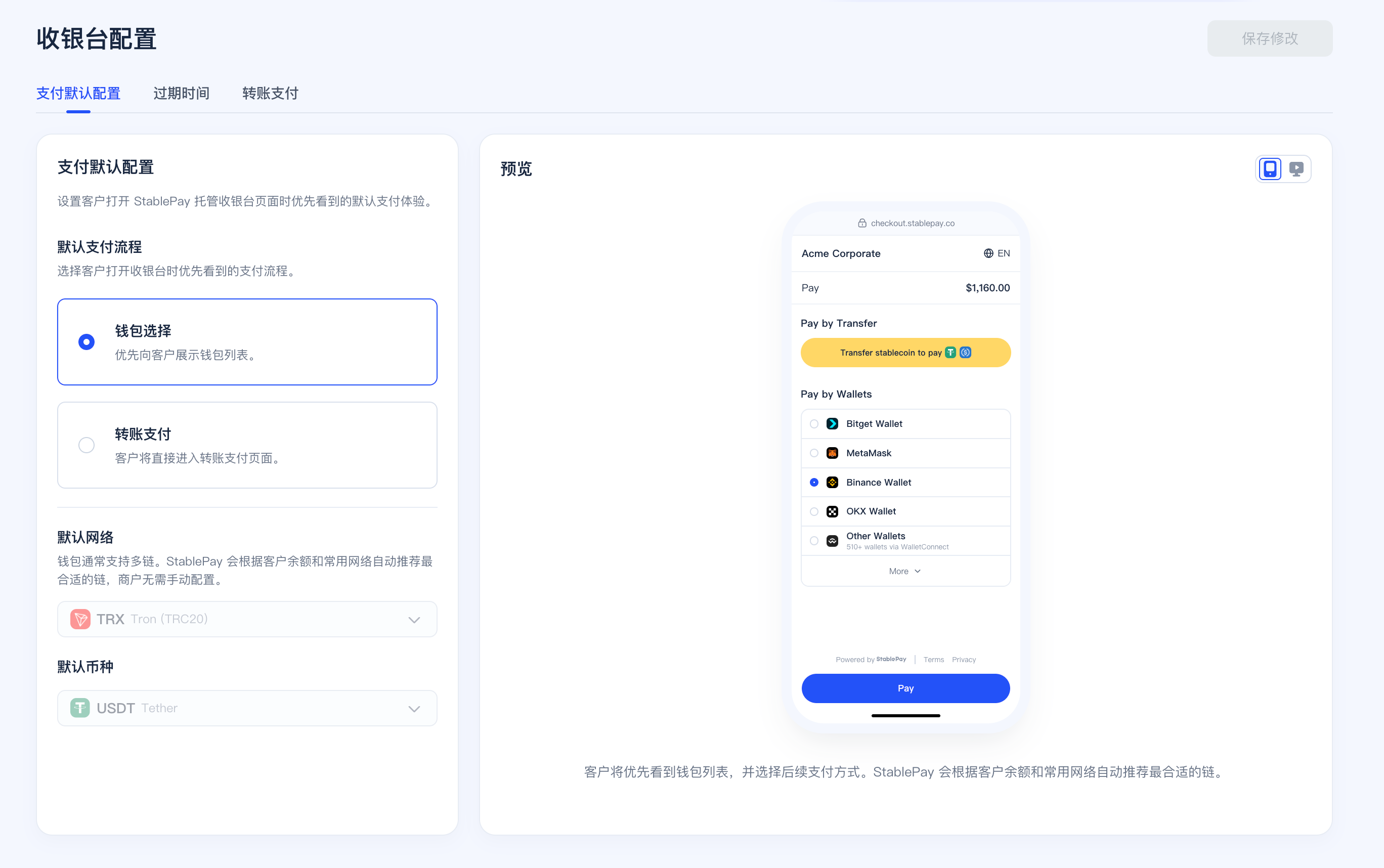
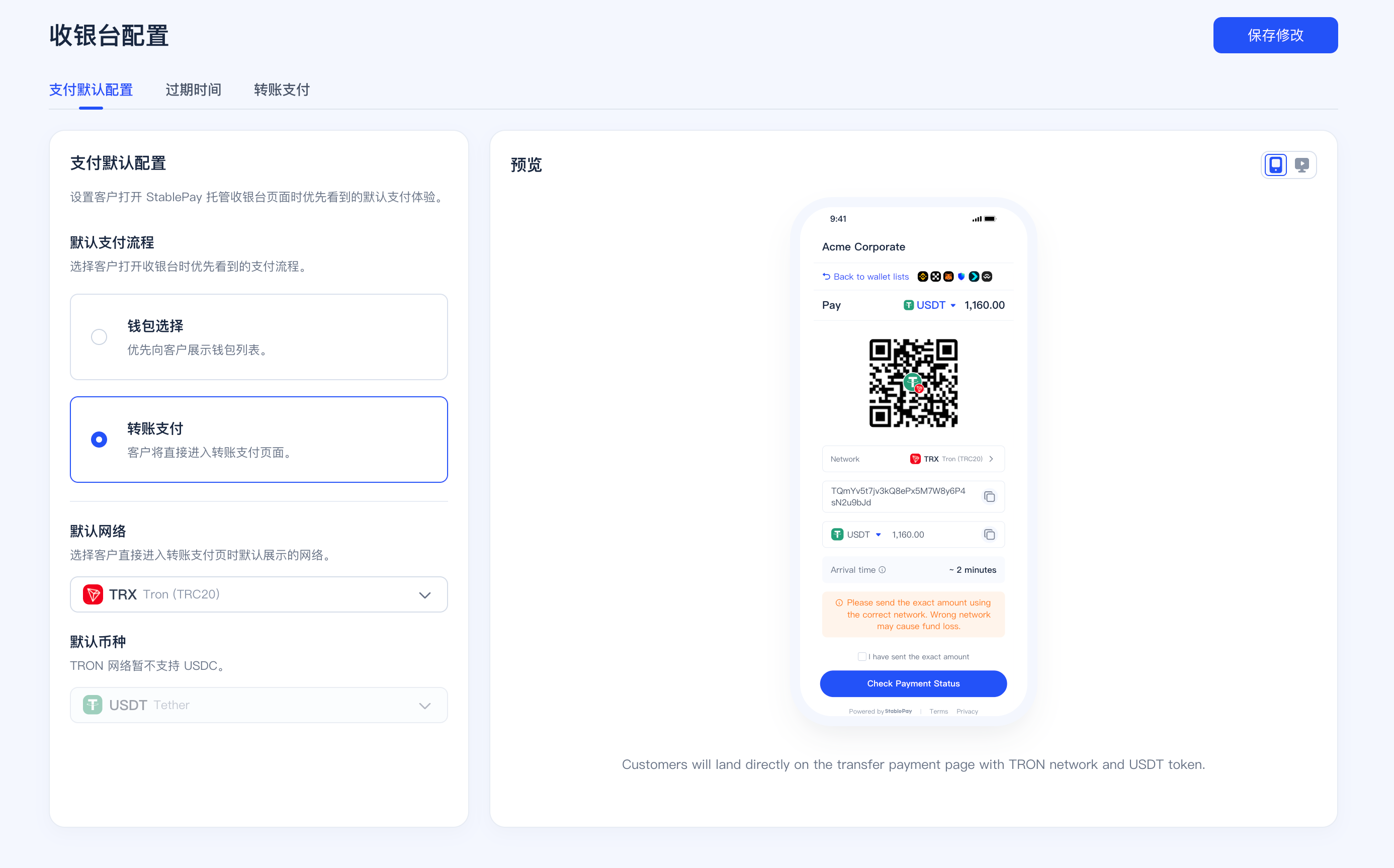
You can now configure the default payment method priority for checkout:
* `Wallet selection`
* `Transfer to Pay`
If your customers more frequently use direct wallet connections, you can keep wallet priority; if your customers more frequently pay via transfer addresses, you can switch the default entry to `Transfer to Pay` to reduce additional user switching steps.
### 2. Transfer Default Network and Currency
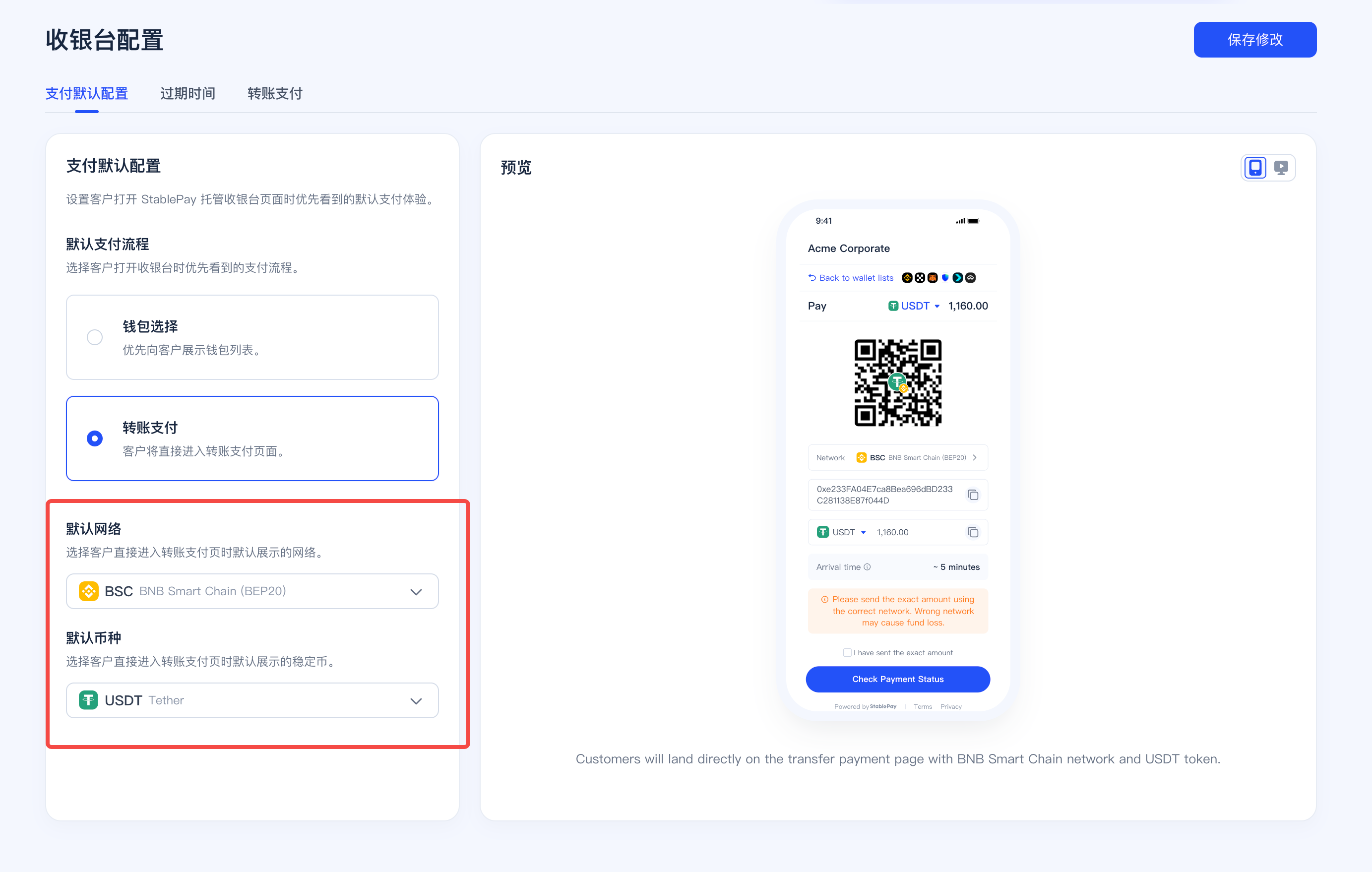
When the default payment method is set to `Transfer to Pay`, merchants can further set the default displayed network and currency to help customers directly enter the most suitable transfer path.
* Configurable default network
* Configurable default displayed currency
* Different networks support different currency ranges; for example, TRON currently only supports USDT
### 3. Checkout Session Expiration Time
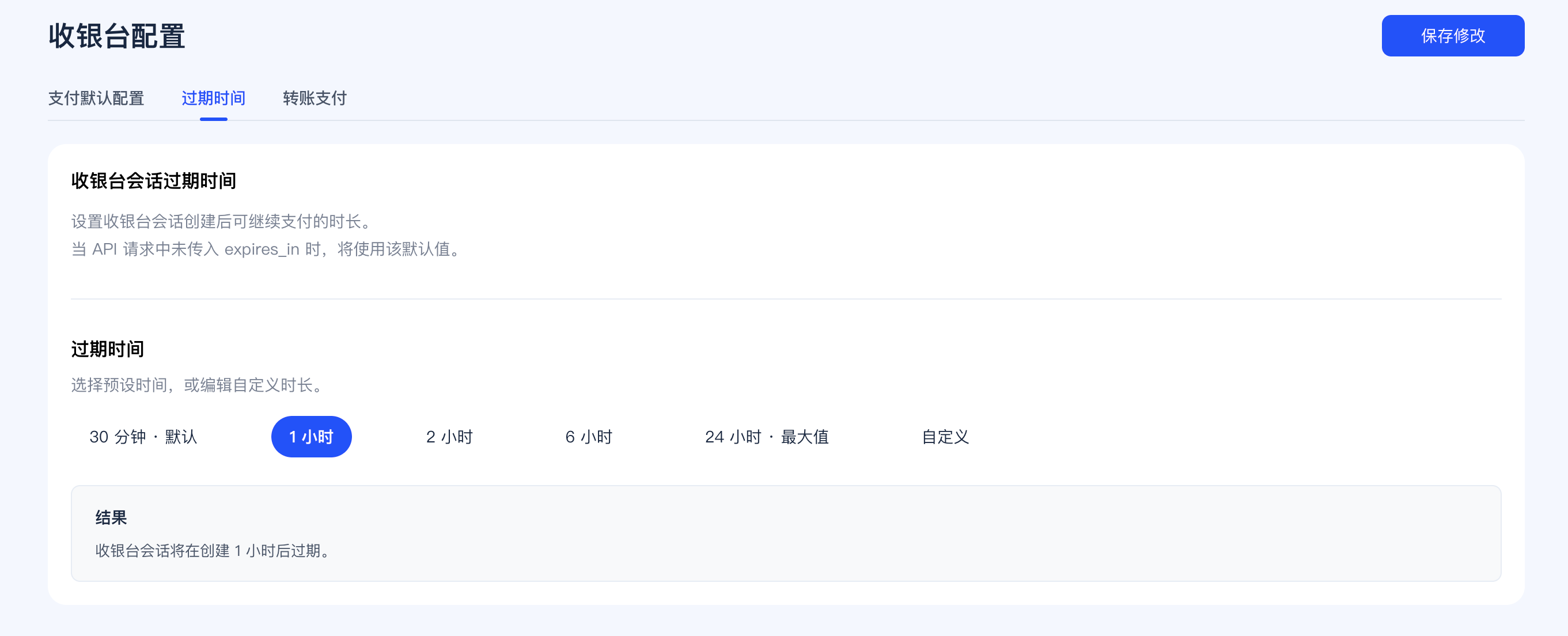
Merchants can now uniformly set the default expiration time for hosted checkout:
* Minimum `30 minutes`
* Maximum `24 hours`
* Takes effect as the merchant default value
* If merchants create checkout sessions via API, they can still override individually via `expires_in`
This setting applies to the checkout session lifecycle shared by Wallet Pay and Transfer to Pay.
### 4. Transfer to Pay Underpayment Tolerance Settings
Transfer to Pay underpayment tolerance now supports separate configuration by business scenario:
* `Checkout` configured separately
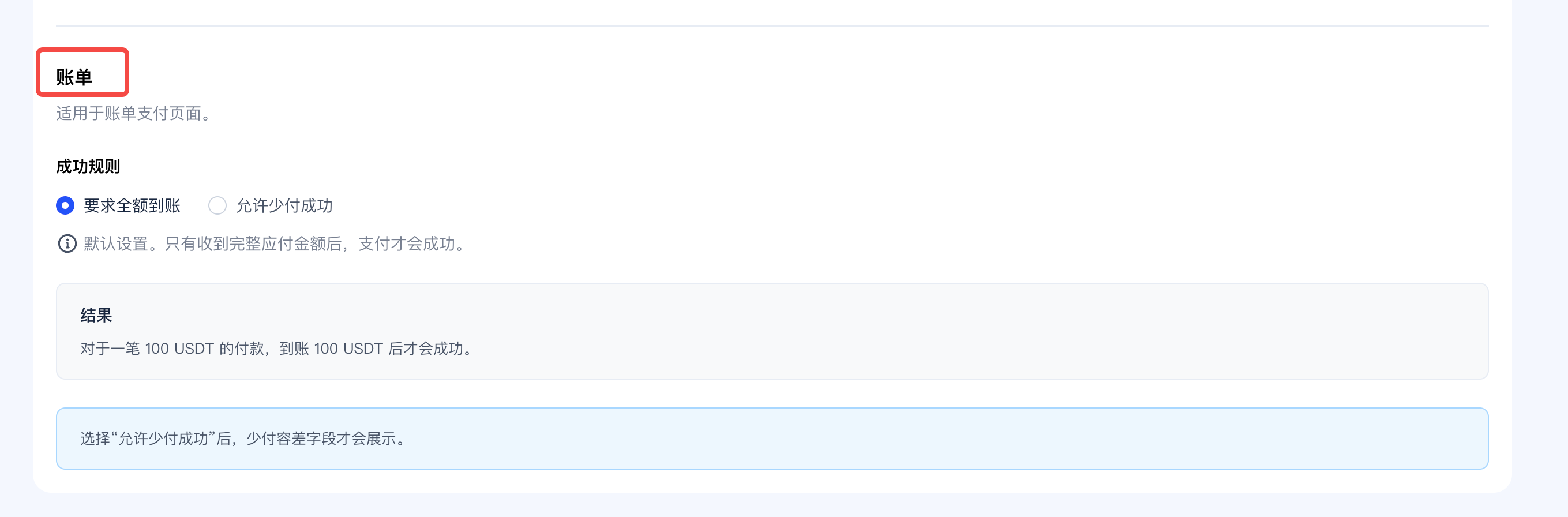
* `Invoicing` configured separately
Merchants can choose:
* Require full amount received
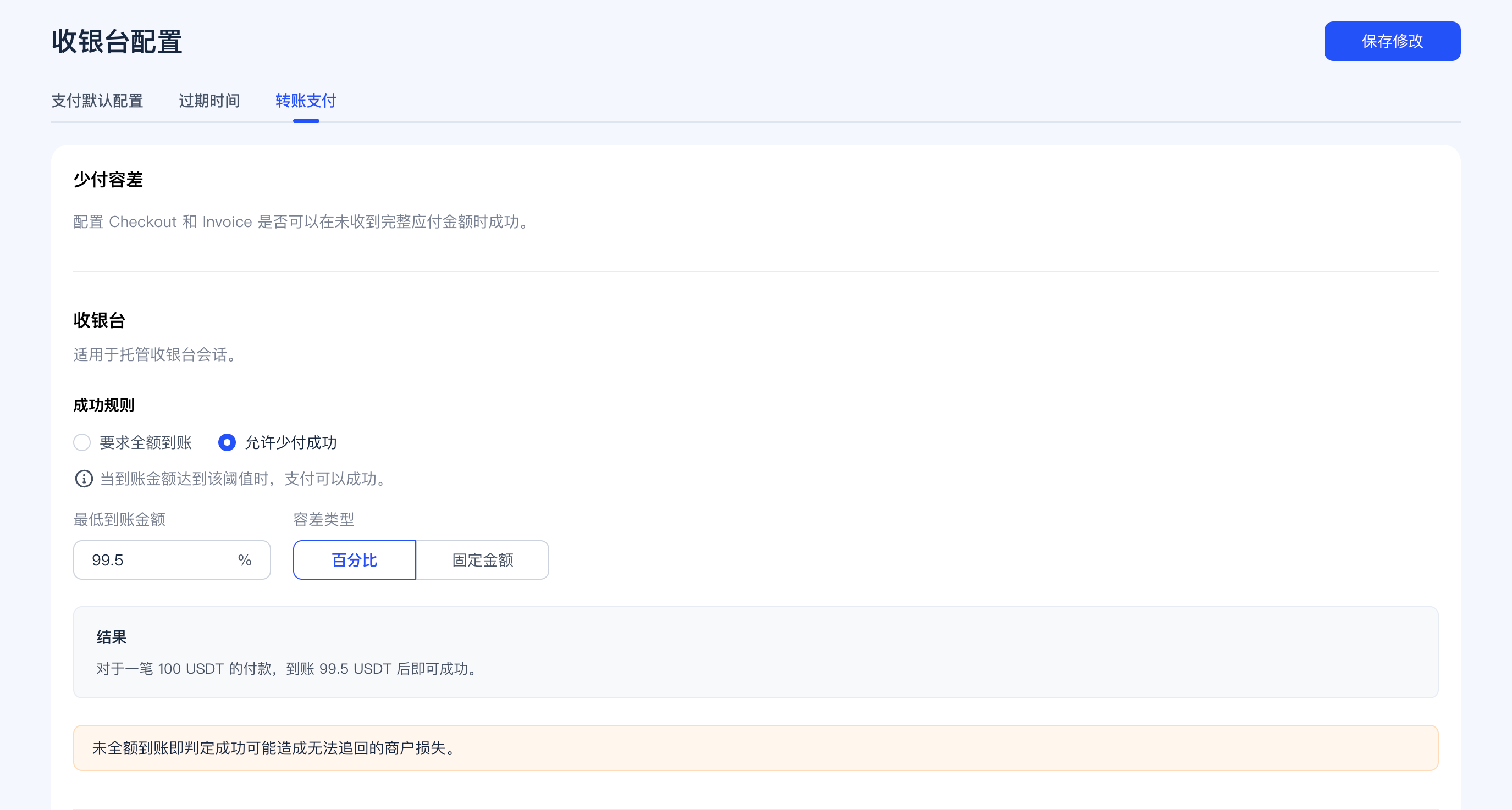
* Allow underpayment success proportionally
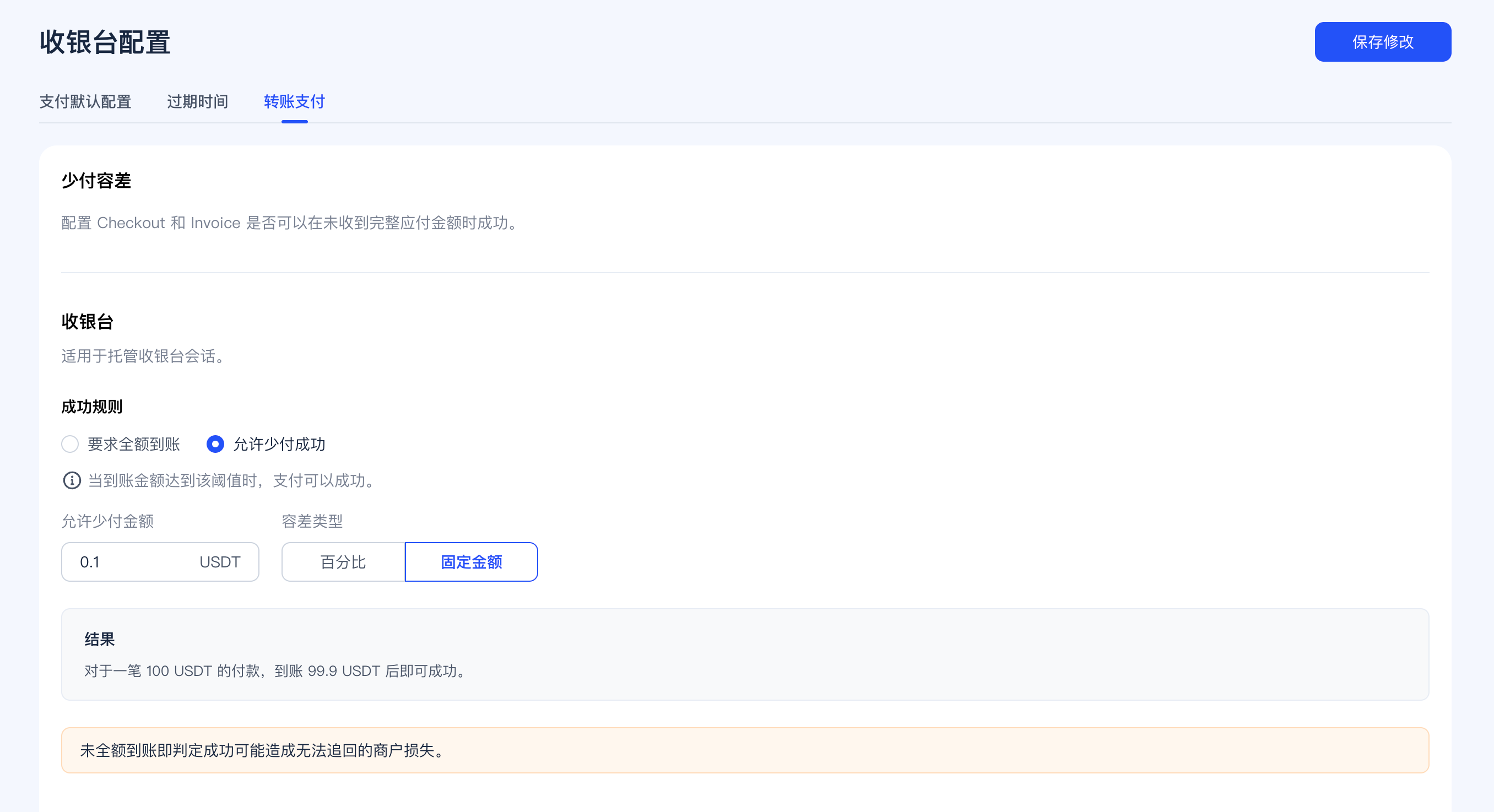
* Allow underpayment success by fixed amount
Unless using full amount received logic, merchants need to self-assess the risk of fulfillment loss that underpayment may bring.
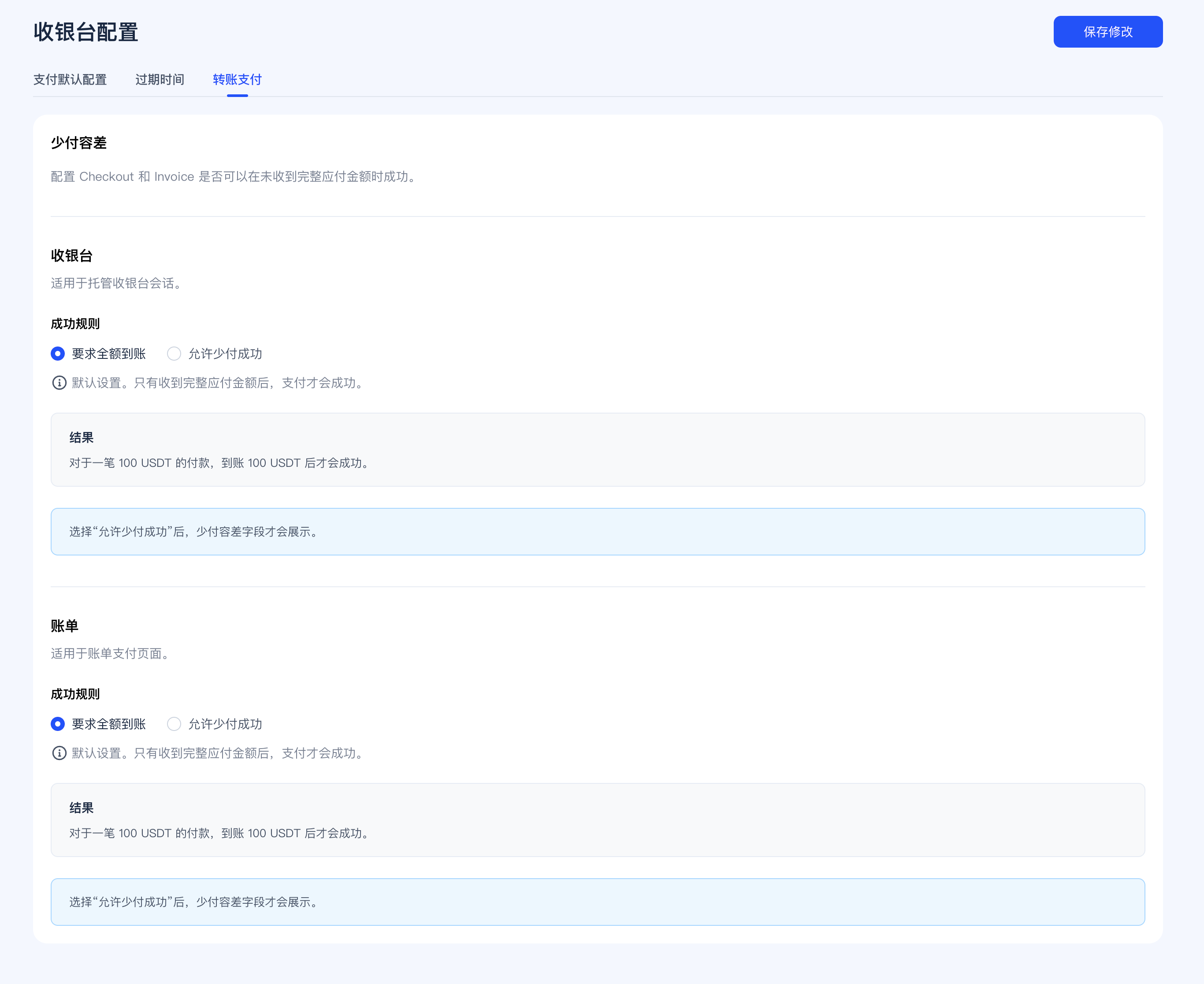
#### Checkout Tolerance Example
When configured by percentage, you can define the minimum receipt requirement as a percentage of the order amount.
When configured by fixed amount, you can define the fixed difference amount allowed for underpayment.
#### Invoicing Tolerance Example
Invoice checkout underpayment tolerance can be configured independently from Checkout, suitable for merchants accepting small tail differences in B2B billing scenarios.
Merchant-side discrepancy handling strategies (such as automatic processing rules after more exceptional receipts) are not yet launched in this release. Therefore, the current documentation only covers default payment methods, Transfer default network and currency, checkout expiration time, and separately configured underpayment tolerance for Checkout / Invoicing.
## Trial Limits and Business Scenario Restrictions
If a merchant has not yet completed KYB verification, certain fund-related scenarios will be restricted according to trial limits. After completing KYB, merchants can use corresponding capabilities according to their formally reviewed and approved configuration.
| Business Scenario | Registered Merchant (KYB Not Completed) |
| :-------------------------- | :-------------------------------------- |
| Fiat deposits | Not supported |
| Fiat withdrawals | Not supported |
| Fiat to stablecoin exchange | Not supported |
| Stablecoin to fiat exchange | Not supported |
| Stablecoin deposits | Supported |
| Stablecoin withdrawals | Supported, limit `1000 USD` |
| Payment collection | Supported, limit `1000 USD` |
| Payouts | Supported, limit `1000 USD` |
| Invoicing | No limit |
The above trial limits are managed at the merchant dimension, with amounts in USD. This means if there are multiple addresses, stores, or business entrances under the same merchant name, they will be calculated in aggregate at the overall merchant dimension.
## Pre-Integration Recommendations
* First review [Supported Wallets](/zh/product/Supported-Wallets) and [Supported Networks](/zh/product/Supported-Networks).
* If you use non-USD pricing, review [Currencies & Auto Currency Conversion](/zh/product/Auto-Currency-Conversion).
* If you plan to accept payments via platform stores, first review [SaaS Platform Integration](/zh/product/SaaS-Platform-Integration).
* If you plan to use Pay Out, first review [Payout to Wallets](/zh/product/Payout-to-Wallets) and [Payout to StablePay Account](/zh/product/Payout-to-StablePay-Account).
* If you plan to use `Corporate Cards`, first review [Corporate Cards](/zh/product/Corporate-Cards).
* If you want hosted pages to display your brand, first complete [Branding Settings](/zh/product/Branding-Settings).
* Before going live, confirm [Compliance and Regional Availability](/zh/product/Compliance-and-Regional-Availability).