> ## Documentation Index
> Fetch the complete documentation index at: https://docs.stablepayfi.ai/llms.txt
> Use this file to discover all available pages before exploring further.
# Invoicing
> Create and deliver stablecoin invoices via email, PDF, and hosted invoice pages.
Invoicing is StablePay's one-time customer billing product for merchants. It is suitable for B2B collections, service fees, wholesale orders, account manager-maintained sales, and manual billing processes—helping merchants send formal, payable, and trackable invoices to designated customers.
Merchants create and manage invoices in the Merchant Portal and deliver them to customers via email, PDF, or hosted invoice page. When an invoice is `open` or `past_due`, the payer can view the invoice details and complete payment on the hosted invoice page. For payers already holding StablePay Global Account balances, invoice checkout now also supports direct payment using Global Account balances.
## Product Demo
## Use Cases
Invoicing is appropriate when payments need to be tied to specific customers and specific invoices.
Common scenarios include:
* B2B or wholesale orders where buyers require formal invoices.
* Professional services, retainers, and sales processes maintained by account managers.
* Manually created payment requests by finance or sales teams.
* Customer-specific amounts, due dates, notes, and line items.
* Processes requiring invoice status tracking, reminders, PDFs, and record retention.
* Payers already holding StablePay Global Account balances who wish to reduce on-chain transfers or wallet connection steps.
If you need a public, reusable payment page that is not pre-bound to a customer, use [Payment Links](/zh/product/Payment-Links). If you need recurring billing, use [Stablecoin Subscriptions](/zh/product/StablePay-Stablecoin-Subscription).
## Workflow
1. The merchant creates an invoice in the Merchant Portal.
2. The invoice contains customer information, line items, amount, due date, and optional notes.
3. The merchant sends or shares the invoice via email, PDF, or hosted invoice page.
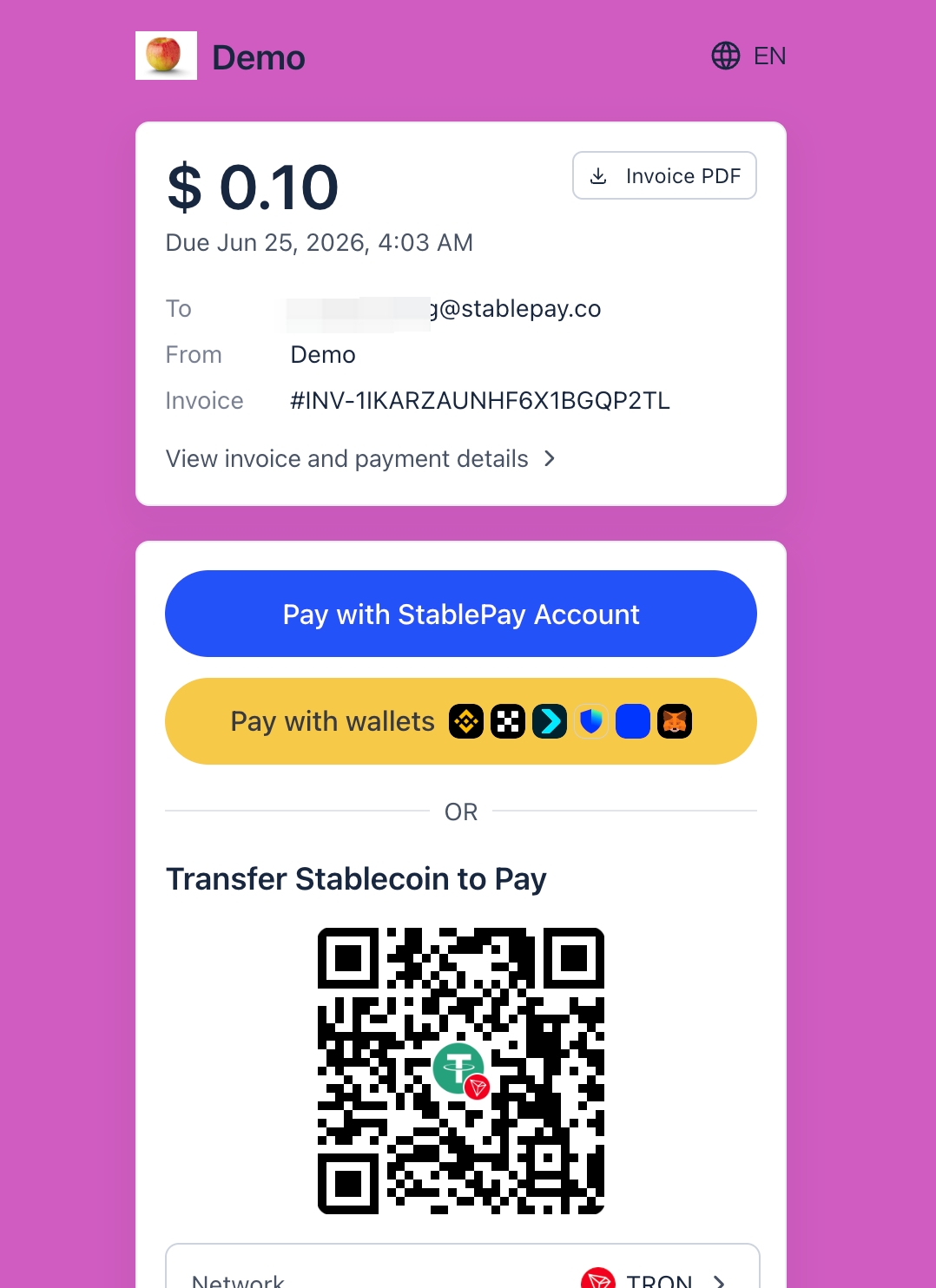
4. The payer opens the hosted invoice page, views the invoice details, and selects an appropriate payment method to complete payment.
5. StablePay updates the invoice and payment records according to the invoice lifecycle.
## Merchant Capabilities
| Capability | Description |
| :-------------------------------- | :--------------------------------------------------------------------------------------------------------------------------- |
| Create and manage invoices | Create one-time bills for designated customers in the Merchant Portal. |
| Email delivery | Send invoices directly to customer email addresses. |
| PDF download | Download or share invoice PDFs to support procurement, finance, and offline processes. |
| Hosted invoice page | Provide a hosted page allowing payers to view bills and initiate payments. |
| Pay with StablePay Global Account | Payers already holding StablePay Global Account balances can complete invoice payments directly using their account balance. |
| Reminders | Manage follow-up reminders for unpaid invoices. |
| Duplicate invoice | Copy existing invoices as a starting point for new bills, suitable for recurring manual billing workflows. |
| Payment records | Track invoice payment activities and their relationship to StablePay payment records. |
## Invoice Lifecycle
| Status | Merchant Semantics |
| :--------- | :--------------------------------------------------------------------------------------- |
| `draft` | Invoice is being prepared and is not yet payable. |
| `open` | Invoice is payable and can be sent or shared with the customer. |
| `past_due` | Invoice remains open, but the due date has passed with an outstanding balance remaining. |
| `paid` | Invoice has been paid in full. |
| `void` | Invoice has been voided and is no longer payable. |
`past_due` is a derived display status used to help merchants identify overdue bills; it does not change the fundamental semantics that the invoice remains `open` and unpaid.
## Hosted Invoice Page
The hosted invoice page is the payer-facing entry point for Invoicing. Payers can view merchant information, customer information, line items, payable amount, due date, and payment status on the page, then initiate payment.
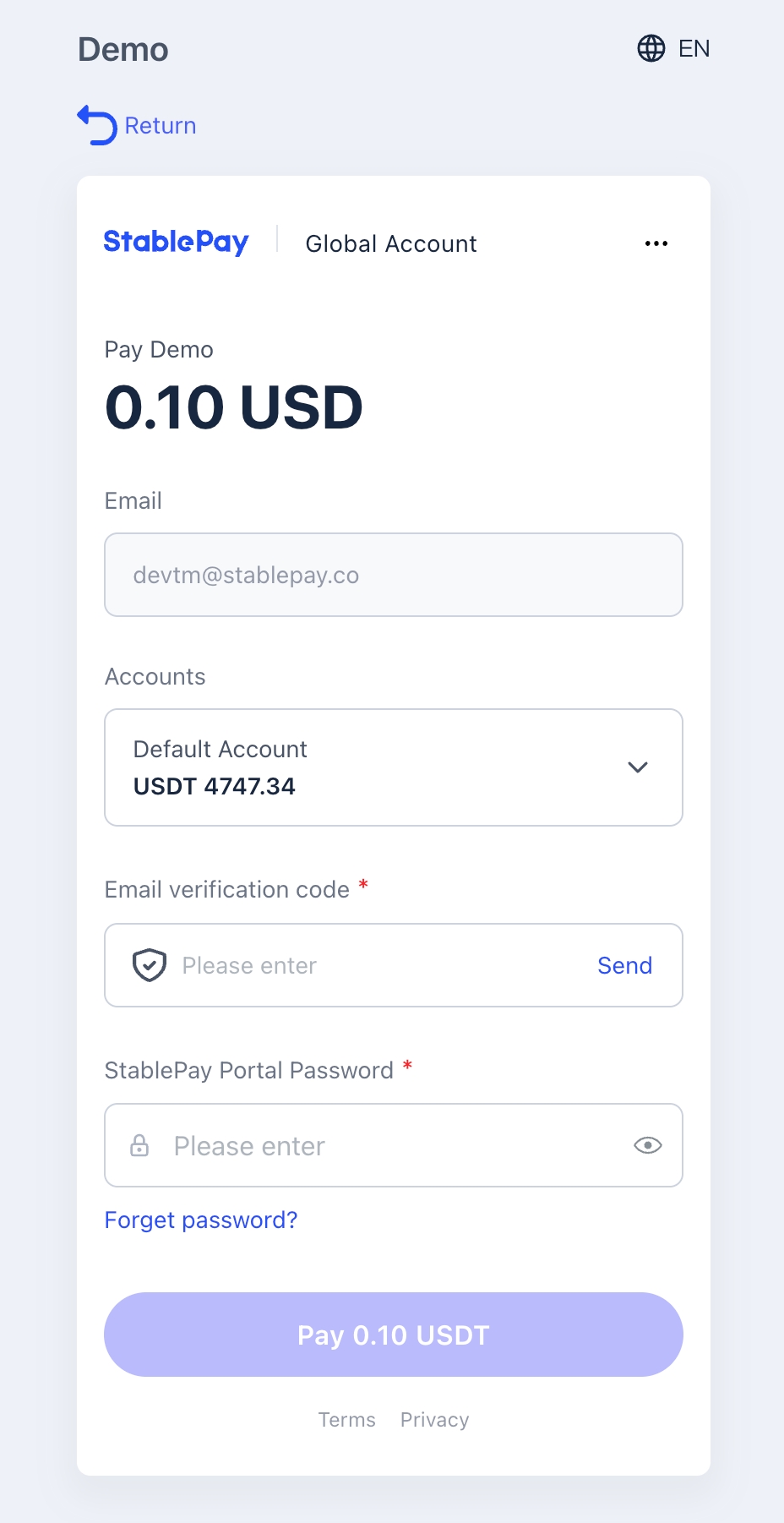
In addition to on-chain transfers and wallet payments, the hosted invoice page now also supports `Pay with StablePay Global Account`. If the payer already has a StablePay Global Account with available balance, they can directly use the balance to complete the invoice payment after logging in and completing necessary security verification, without needing to initiate an on-chain transfer.
| Invoice Status | Hosted Page Behavior |
| :------------- | :------------------------------------------------------------------------- |
| `open` | Payer can view details and pay. |
| `past_due` | Payer can still view details and pay, while seeing the overdue context. |
| `paid` | Page is retained for record viewing and receipt-like payment confirmation. |
| `void` | Page is retained for record viewing, but payment cannot continue. |
PDF invoice and receipt behavior changes with invoice status. Open, past due, paid, and void invoices may all be retained as records; receipts are more suitable for after successful payment.
## Pay with StablePay Global Account
For payers already holding StablePay Global Accounts, invoice checkout provides a shorter payment path:
1. The payer opens the hosted invoice page.
2. Selects `Pay with StablePay Global Account`.
3. If not already logged in, must first log in to the StablePay Global Account.
4. After completing necessary security verification, views available balance and selects the account and currency to pay with.
5. Upon confirming payment, the system directly deducts from the Global Account balance and updates the invoice status.
This method is particularly suitable for customers who already hold balances within the StablePay account system and need to process invoice payments frequently.
## Manual Invoices vs Subscription Invoices
Manual invoices are created by merchants for one-time customer billing processes and belong to the Invoicing product experience.
Subscription-generated invoices are created by the subscription billing lifecycle. They may appear as billing records in reports or invoice views, but may be read-only in the Portal invoice workflow because their lifecycle is controlled by the subscription system.
## Invoicing vs Payment Links
| Invoicing | Payment Links |
| :------------------------------------------------------------------ | :-------------------------------------------------------------- |
| Targeted at designated customers and specific bills | Public and reusable |
| Contains invoice details, due date, and customer context | Customer information can be collected at checkout |
| Delivered via email, PDF, or hosted invoice page | Shared via hosted payment page or QR-code-friendly links |
| Suitable for B2B, finance, and account manager-maintained processes | Suitable for events, social sales, and one-to-many distribution |
## Important Notes
* Invoicing is for one-time invoice processes with designated customers and is not suitable for public, reusable payment pages.
* StablePay Global Account balance payment is currently available for invoice checkout scenarios; availability depends on whether the payer has an available StablePay Global Account balance.
* Refunds are initiated based on payments. Refunding a payment does not automatically rewrite the invoice state machine.
* Subscription-linked invoices may exist as billing records but are not equivalent to manually created invoices.
* When customers need to view the bill before paying, use the hosted invoice page as the payment entry point.
## Related Pages
* [Payment Links](/zh/product/Payment-Links)
* [Stablecoin Checkout](/zh/product/Stablecoin-Checkout)
* [Stablecoin Subscriptions](/zh/product/StablePay-Stablecoin-Subscription)
* [Refunds](/zh/product/Refunds)
* [Currencies & Auto Currency Conversion](/zh/product/Auto-Currency-Conversion)
 This method is particularly suitable for customers who already hold balances within the StablePay account system and need to process invoice payments frequently.
## Manual Invoices vs Subscription Invoices
Manual invoices are created by merchants for one-time customer billing processes and belong to the Invoicing product experience.
Subscription-generated invoices are created by the subscription billing lifecycle. They may appear as billing records in reports or invoice views, but may be read-only in the Portal invoice workflow because their lifecycle is controlled by the subscription system.
## Invoicing vs Payment Links
| Invoicing | Payment Links |
| :------------------------------------------------------------------ | :-------------------------------------------------------------- |
| Targeted at designated customers and specific bills | Public and reusable |
| Contains invoice details, due date, and customer context | Customer information can be collected at checkout |
| Delivered via email, PDF, or hosted invoice page | Shared via hosted payment page or QR-code-friendly links |
| Suitable for B2B, finance, and account manager-maintained processes | Suitable for events, social sales, and one-to-many distribution |
## Important Notes
* Invoicing is for one-time invoice processes with designated customers and is not suitable for public, reusable payment pages.
* StablePay Global Account balance payment is currently available for invoice checkout scenarios; availability depends on whether the payer has an available StablePay Global Account balance.
* Refunds are initiated based on payments. Refunding a payment does not automatically rewrite the invoice state machine.
* Subscription-linked invoices may exist as billing records but are not equivalent to manually created invoices.
* When customers need to view the bill before paying, use the hosted invoice page as the payment entry point.
## Related Pages
* [Payment Links](/zh/product/Payment-Links)
* [Stablecoin Checkout](/zh/product/Stablecoin-Checkout)
* [Stablecoin Subscriptions](/zh/product/StablePay-Stablecoin-Subscription)
* [Refunds](/zh/product/Refunds)
* [Currencies & Auto Currency Conversion](/zh/product/Auto-Currency-Conversion)
This method is particularly suitable for customers who already hold balances within the StablePay account system and need to process invoice payments frequently.
## Manual Invoices vs Subscription Invoices
Manual invoices are created by merchants for one-time customer billing processes and belong to the Invoicing product experience.
Subscription-generated invoices are created by the subscription billing lifecycle. They may appear as billing records in reports or invoice views, but may be read-only in the Portal invoice workflow because their lifecycle is controlled by the subscription system.
## Invoicing vs Payment Links
| Invoicing | Payment Links |
| :------------------------------------------------------------------ | :-------------------------------------------------------------- |
| Targeted at designated customers and specific bills | Public and reusable |
| Contains invoice details, due date, and customer context | Customer information can be collected at checkout |
| Delivered via email, PDF, or hosted invoice page | Shared via hosted payment page or QR-code-friendly links |
| Suitable for B2B, finance, and account manager-maintained processes | Suitable for events, social sales, and one-to-many distribution |
## Important Notes
* Invoicing is for one-time invoice processes with designated customers and is not suitable for public, reusable payment pages.
* StablePay Global Account balance payment is currently available for invoice checkout scenarios; availability depends on whether the payer has an available StablePay Global Account balance.
* Refunds are initiated based on payments. Refunding a payment does not automatically rewrite the invoice state machine.
* Subscription-linked invoices may exist as billing records but are not equivalent to manually created invoices.
* When customers need to view the bill before paying, use the hosted invoice page as the payment entry point.
## Related Pages
* [Payment Links](/zh/product/Payment-Links)
* [Stablecoin Checkout](/zh/product/Stablecoin-Checkout)
* [Stablecoin Subscriptions](/zh/product/StablePay-Stablecoin-Subscription)
* [Refunds](/zh/product/Refunds)
* [Currencies & Auto Currency Conversion](/zh/product/Auto-Currency-Conversion)