> ## Documentation Index
> Fetch the complete documentation index at: https://docs.stablepayfi.ai/llms.txt
> Use this file to discover all available pages before exploring further.
# Telegram Payment Notifications
> Set up Telegram Bot notifications in the StablePay Portal so your team can receive real-time payment alerts in a Telegram group.
Telegram Payment Notifications lets merchants configure a Telegram Bot in the StablePay Portal and send payment alerts to their own Telegram group.
This capability is useful for operations, support, finance, or risk teams that want faster visibility into payment status changes, especially when manual follow-up or exception handling is part of the workflow.
Go directly to the Telegram notification settings page in the StablePay Portal to configure your Bot Token and group binding.
## When to use it
Consider enabling this feature when:
* you want your team to see successful, failed, or expired payments in real time in Telegram
* you need faster visibility into underpaid, overpaid, or risk-review payment cases
* you want merchant order IDs included in notifications for reconciliation
* your operations flow depends on internal teams acting on payment events, not only on system callbacks
## Feature overview
The current release supports payment-related notifications in Telegram, including:
* Payment succeeded notifications
* Payment failed notifications
* Payment expired notifications
* Underpaid and overpaid payment alerts
* Risk review payment alerts
* Includes merchant order ID for reconciliation
Notifications are isolated at the merchant level. After binding is complete, the group only receives payment notifications for the current merchant account.
## Before you start
Before setup, make sure:
* you have a Telegram account you can log in to
* you can use [@BotFather](https://t.me/BotFather) to create a Telegram Bot
* you already have, or are ready to create, a Telegram group for receiving notifications
## How to set it up
### Step 1: Create a Telegram Bot with BotFather
Every Telegram Bot needs an API Token issued by `@BotFather`.
1. Open Telegram and search for [@BotFather](https://t.me/BotFather)
2. Send `/newbot`
3. Set a Bot display name, such as `stablepay bot`
4. Set a unique username ending in `bot`, such as `stablepay1bot`
5. Copy the API Token returned by BotFather
The Bot Token is a sensitive credential. Keep it secure and do not expose it to unauthorized people or commit it to a public repository.
### Step 2: Save the Bot Token in the merchant portal
Open the [Telegram notification settings page](https://merchant.stablepay.co/#/settings/telegram-notifications), paste the Bot Token, and save it.
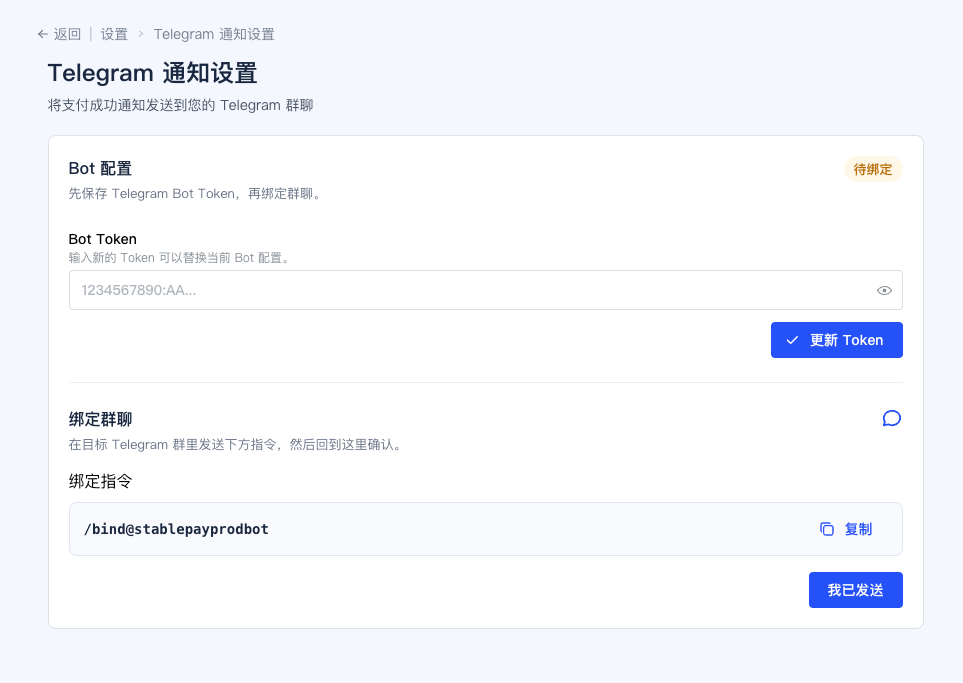 After the token is saved successfully, the page will generate a binding command for that Bot.
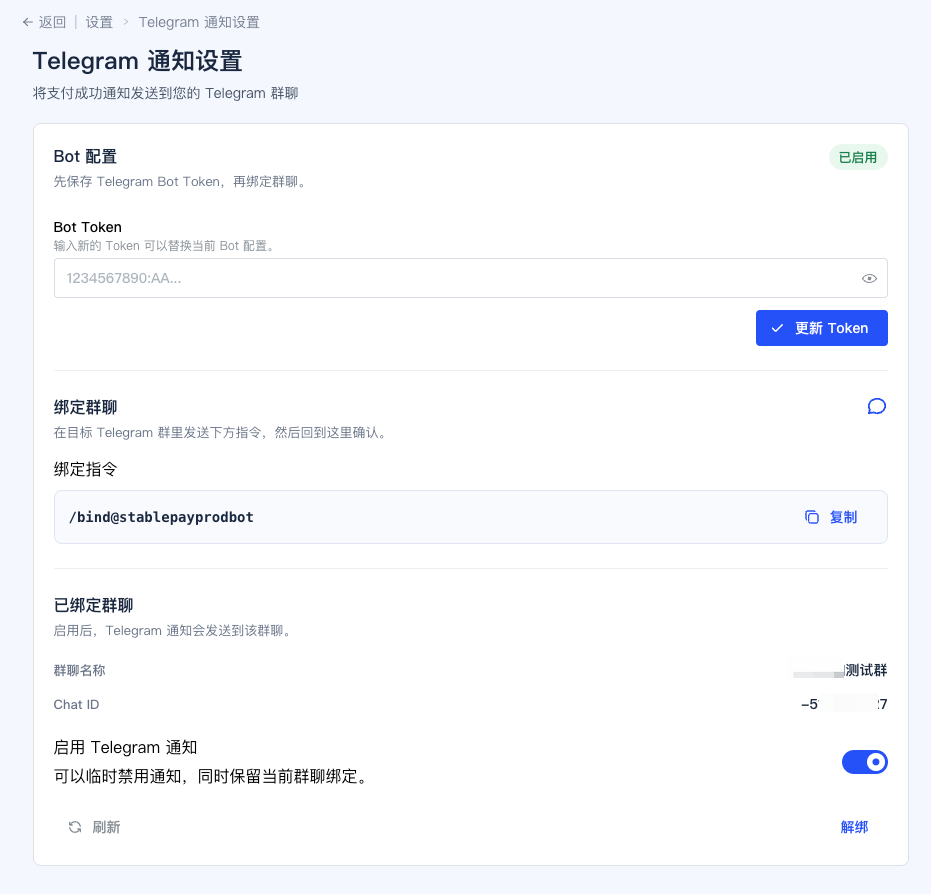 ### Step 3: Create the group and complete binding
1. Create a Telegram group for receiving notifications
2. Add the Bot to that group
3. Send the binding command shown in the merchant portal to the Bot
4. Return to the merchant portal and click `I have sent it`
After binding succeeds, the merchant portal will show the bound group ID and group name.
At that point, Telegram payment notifications are fully configured for the merchant account.
## What you get after setup
Once setup is complete, your team can receive StablePay payment notifications in Telegram and react more quickly to:
* successful payments
* failed or expired payments
* underpaid and overpaid orders
* risk-review and exceptional payment cases
## Example notification output
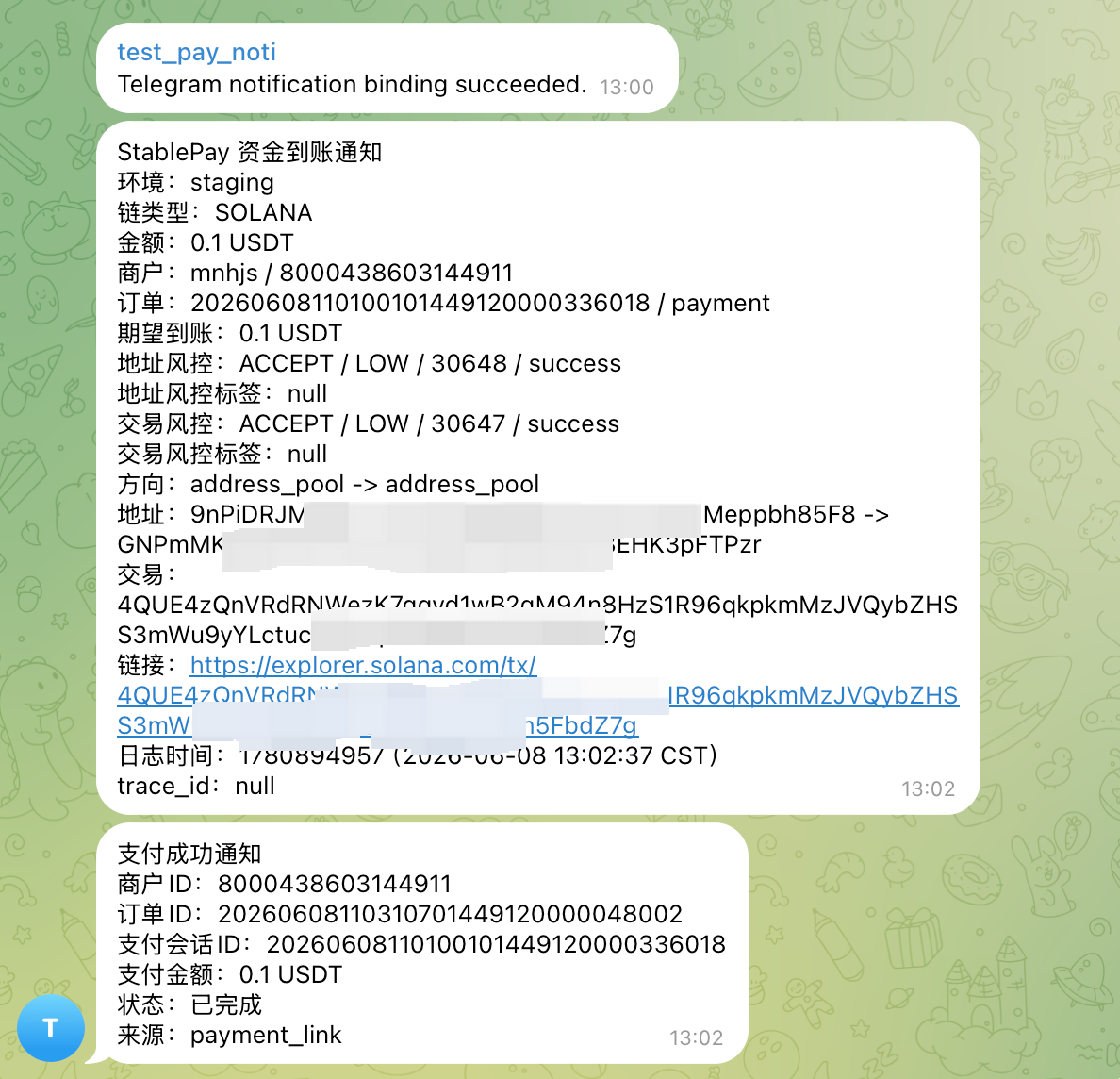
The example below shows what Telegram notifications can look like after setup is complete.
### Step 3: Create the group and complete binding
1. Create a Telegram group for receiving notifications
2. Add the Bot to that group
3. Send the binding command shown in the merchant portal to the Bot
4. Return to the merchant portal and click `I have sent it`
After binding succeeds, the merchant portal will show the bound group ID and group name.
At that point, Telegram payment notifications are fully configured for the merchant account.
## What you get after setup
Once setup is complete, your team can receive StablePay payment notifications in Telegram and react more quickly to:
* successful payments
* failed or expired payments
* underpaid and overpaid orders
* risk-review and exceptional payment cases
## Example notification output
The example below shows what Telegram notifications can look like after setup is complete.
 ## Important notes
* This page describes the current self-service setup flow and no longer uses a request-based enablement process
* This release currently supports payment-related events only
* It does not yet include refunds, subscriptions, payouts, settlements, or invoice event notifications
* If you rotate the Bot Token, recheck the binding status afterward
* This is an optional operational setup and does not block your use of Checkout, Payment Links, Invoicing, or the API
## Related pages
* [Get Started](/en/product/Get-Started)
* [Stablecoin Checkout](/en/product/Stablecoin-Checkout)
* [Payment Links](/en/product/Payment-Links)
* [Invoicing](/en/product/Invoicing)
* [Branding Settings](/en/product/Branding-Settings)
## Important notes
* This page describes the current self-service setup flow and no longer uses a request-based enablement process
* This release currently supports payment-related events only
* It does not yet include refunds, subscriptions, payouts, settlements, or invoice event notifications
* If you rotate the Bot Token, recheck the binding status afterward
* This is an optional operational setup and does not block your use of Checkout, Payment Links, Invoicing, or the API
## Related pages
* [Get Started](/en/product/Get-Started)
* [Stablecoin Checkout](/en/product/Stablecoin-Checkout)
* [Payment Links](/en/product/Payment-Links)
* [Invoicing](/en/product/Invoicing)
* [Branding Settings](/en/product/Branding-Settings)