
Basic Information
Prerequisites
Before beginning integration, please confirm that you have:- Registered a StablePay merchant account and completed the qualification review
- Created a store in the merchant dashboard, selected API as the channel type, and awaited review approval
- Generated and obtained the following in the store’s Key Management menu:
- API Key: Used in the
Authorizationrequest header to identify the caller - Secret Key: Used to generate request signatures, please store it securely and never commit it to public code repositories or share it with others
- API Key: Used in the
Creating an API Store
If your team plans to integrate via the StablePay API, please first visit the Stores and Developers page.Step 1: Create an API Store
- Open the Stores and Developers page.
- Click Create Store.
- Select API as the channel type.
- Enter the store name and domain according to your actual business information.
- Submit the creation request and await review by the StablePay operations team.
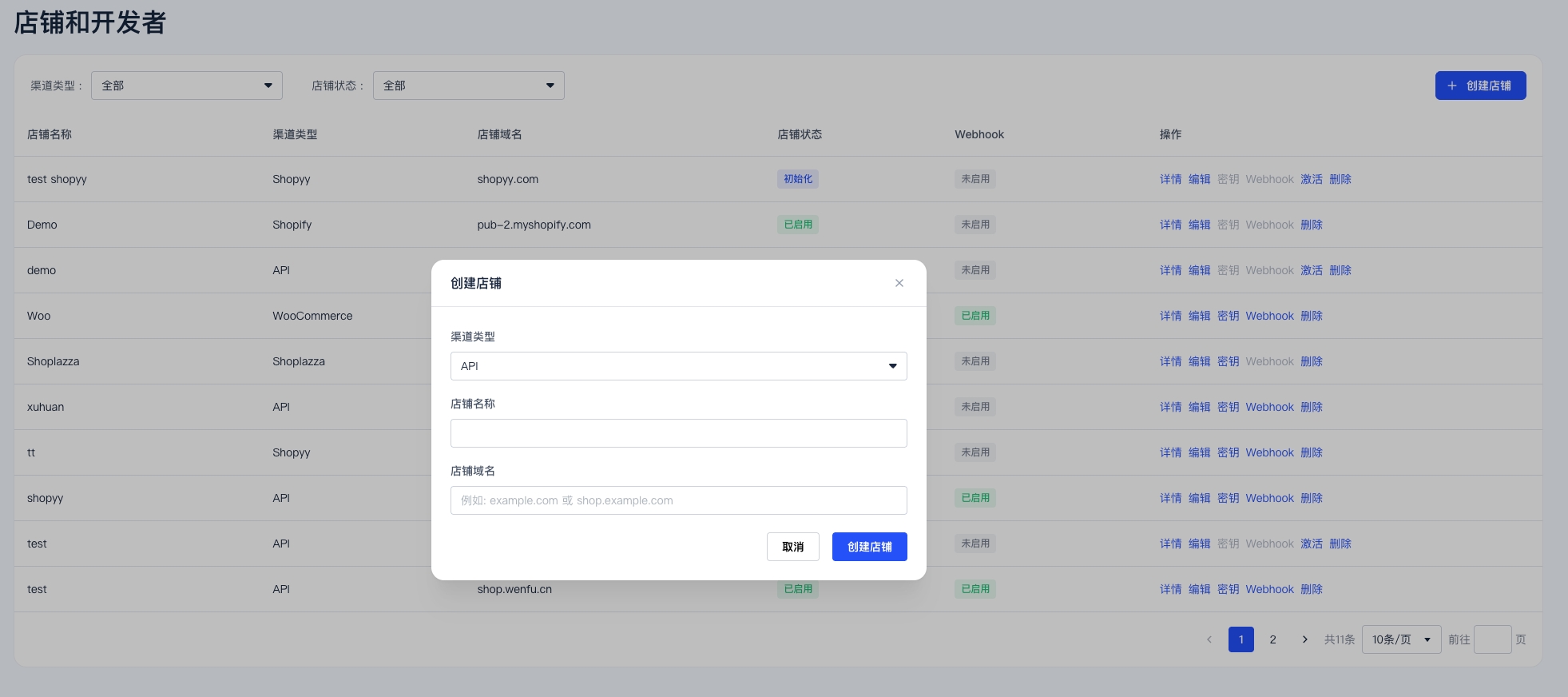
API credentials and Webhook settings are created and managed at the store level. Please confirm you have created the correct store and wait for it to be reviewed and activated before proceeding.
Step 2: Wait for Store Activation
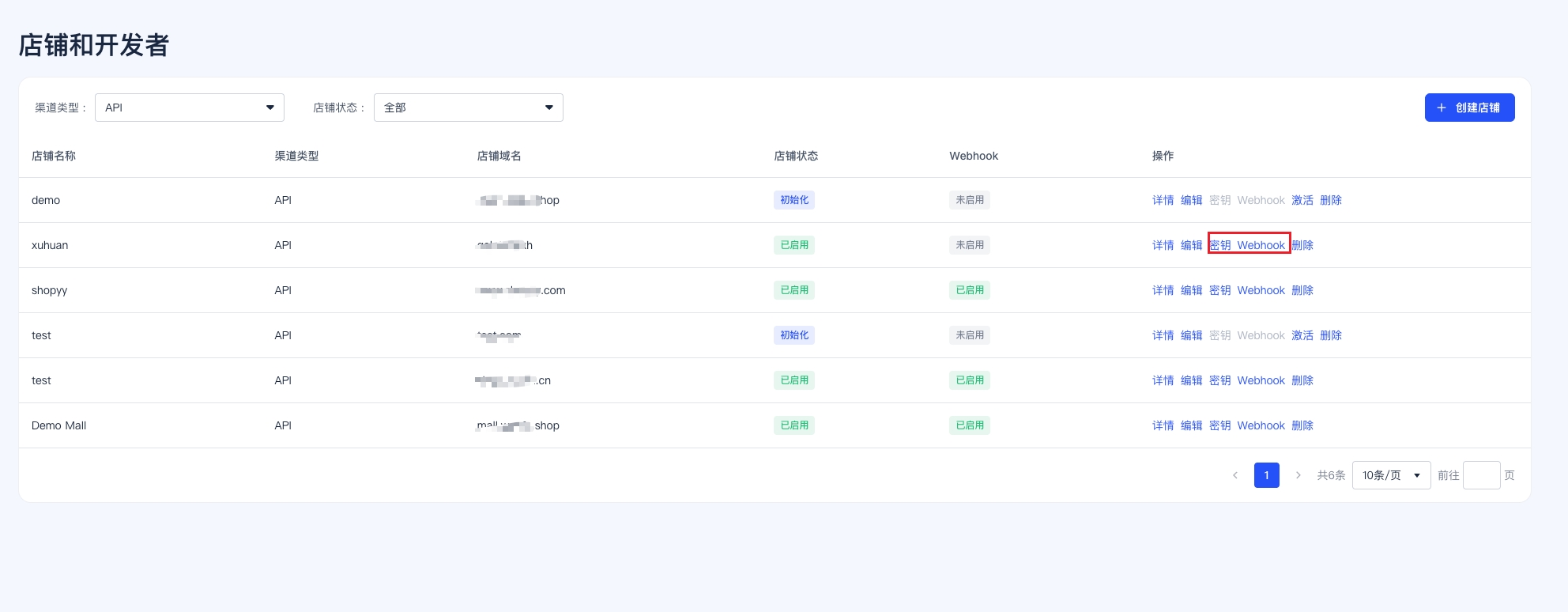
Once the review is complete, the store status will display as Activated. Only after the store is activated can you access the Keys and Webhook configuration options in the store’s action menu.Creating an API Key and Secret Key
Once the store status displays as Activated:- Return to the Stores and Developers page.
- Open the action menu for the corresponding store.
- Click Keys.
- Create the API Key and Secret Key.
- If the validity period is set to
0 days, the key will remain valid indefinitely.
Authentication and Signing
Required Request Headers
All API requests must include the following headers:Signature Payload Construction
{requestBody}: For POST/PUT requests, the raw JSON string (do not reserialize or format)- For GET/DELETE methods with no request body:
{requestBody}is an empty string - Signature algorithm:
HMAC-SHA256(sign_payload, secret_key)→ lowercase hex string
Example Code
Required Headers by Endpoint
POST /api/v1/subscriptions/createalso requires theIdempotency-Keyheader. When retrying with the same key, the server returns the initially created subscription object.
Idempotency
The following endpoints support idempotency using merchant-defined IDs as idempotency keys:
When submitting with the same idempotency key, the server returns the initially created resource without generating duplicate data.
Webhook Notifications
StablePay asynchronously pushes key events to your configured callback URL via Webhook.If you need to view event examples, risk control freeze status explanations, and handling suggestions forpayment.failedwithstatus = "frozen", please refer to Webhook Notifications.
Event Types
Webhook Request Headers
Signature Verification Steps
-
Extract
X-StablePay-Signature,X-StablePay-Timestamp, andX-StablePay-Noncefrom the request headers; - Verify that the timestamp is within 5 minutes of the current time (replay prevention)
- Verify that the Nonce length is between 16 and 64 characters
-
Take the raw request body bytes (do not parse then reserialize), and concatenate as follows:
- Calculate HMAC-SHA256 using your Secret Key to obtain a lowercase hex string
-
Compare with the signature in the request header using constant-time comparison (e.g.,
hmac.compare_digest)
Response Requirements and Retry Strategy
- Your service must return HTTP
2xxwithin 30 seconds - Returning
429or5xxwill enter the retry queue; other4xxresponses will not be retried - Maximum of 10 retries, using exponential backoff intervals (minutes):
2, 4, 8, 16, 32, 64, 128, 256, 512, 1024
Idempotent Consumption
Please useX-StablePay-Event-ID (or the id field in the request body) as the idempotency key. Check whether the event has already been processed before handling to avoid side effects from duplicate delivery.
Error Responses
Errors are returned using HTTP status codes with a JSON response body. Theerror field may be a string or a structured object:
Security Recommendations
- The Secret Key must only be used server-side and must not appear in frontend code, APKs, mini-program packages, or logs
- We recommend injecting the Secret Key via key management services (KMS/Vault/SSM) in your CI/CD pipeline
- Webhook callback URLs must use HTTPS
- For each received Webhook, perform signature verification + idempotent deduplication + business status verification (e.g., ensure the order status is “paid” before processing a refund)
- Regularly rotate your API Key and Secret Key in the merchant backend