
Configuring Webhooks in the Merchant Portal
Before your server can receive Webhook notifications, you need to create an API store and configure the callback address in the Stores and Developers page.Step 1: Create an API Store
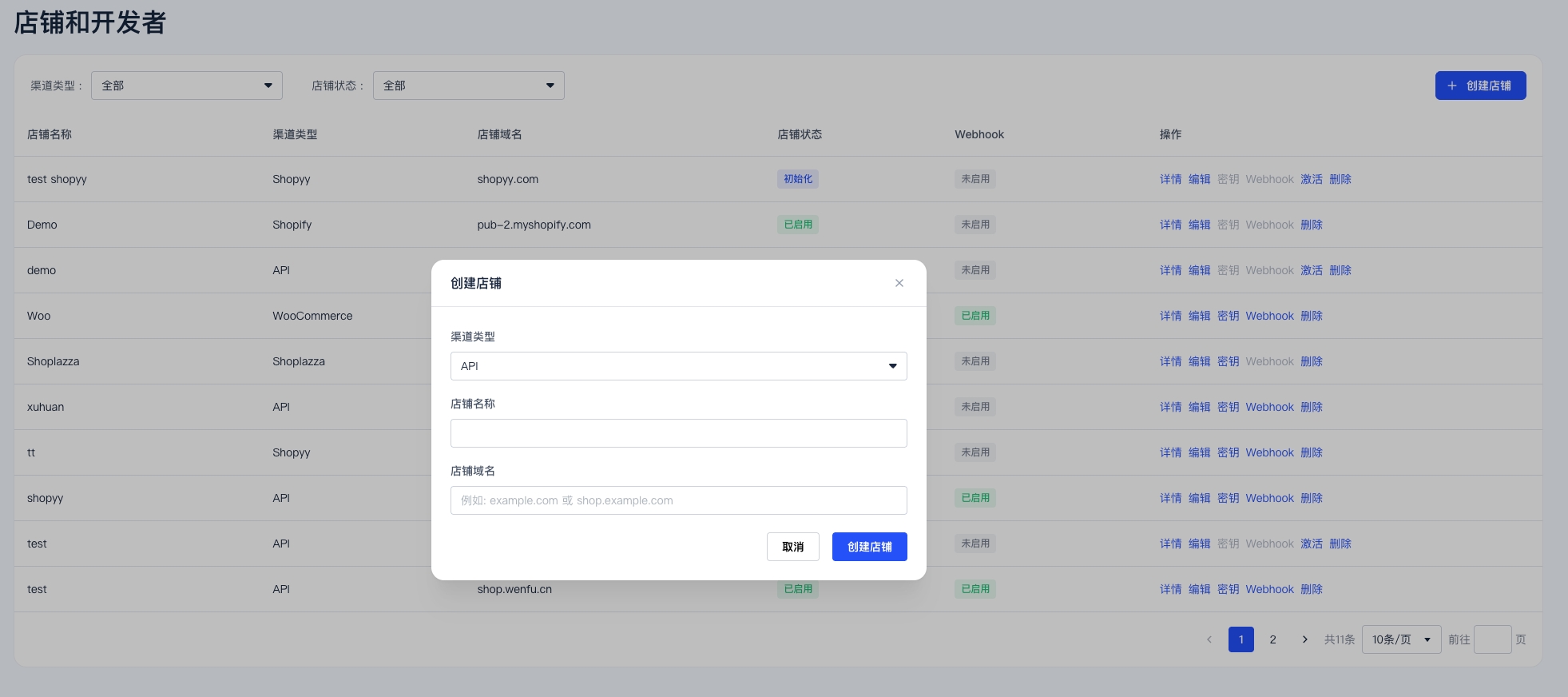
- Open the Stores and Developers page.
- Click Create Store.
- Select API as the channel type.
- Fill in the store name and domain according to your actual business information.
- Submit the application and wait for StablePay review.
Step 2: Configure Webhook after Store Activation
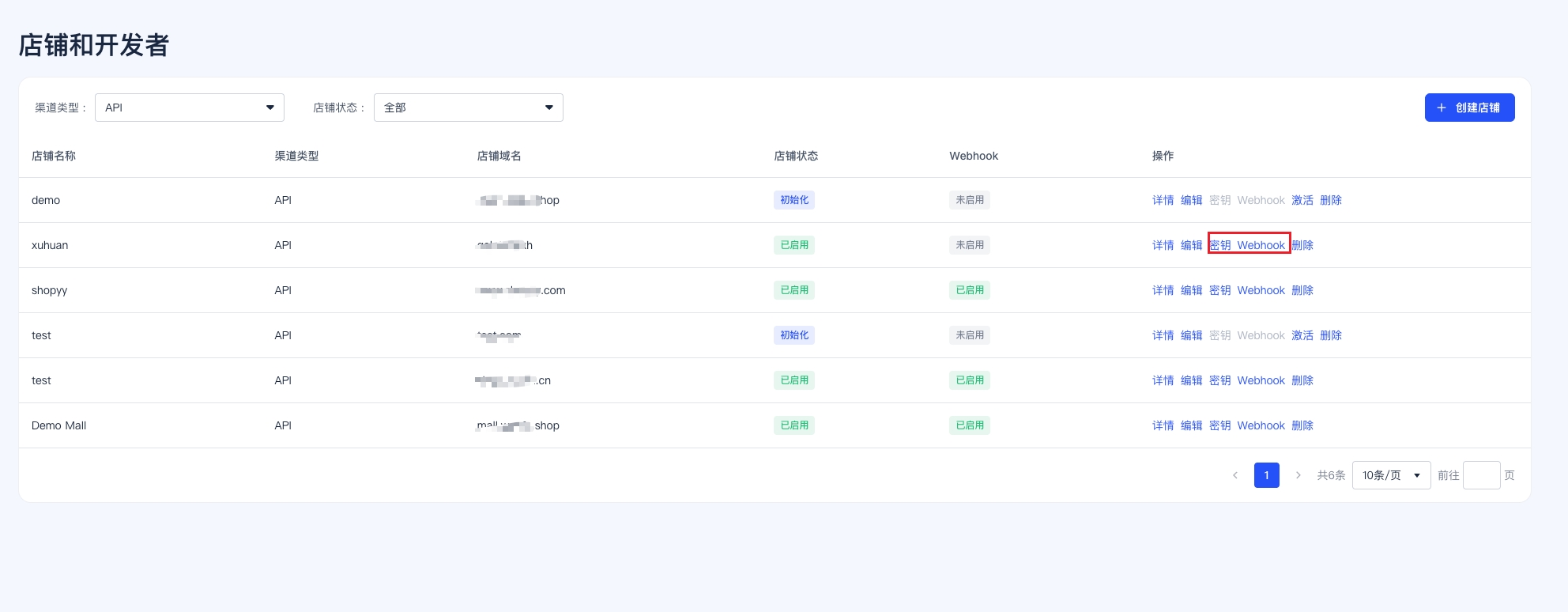
Once the store status changes to Enabled:- Return to the Stores and Developers page.
- Open the action menu for the corresponding store.
- Click Webhook.
- Fill in your Webhook callback URL and save.
- If needed, you can also click Keys in the same action menu to create the API Key and Secret Key required for server-side integration.
- If the validity period is set to
0 days, it means the key is valid indefinitely.
It is recommended to use an HTTPS server address accessible from the StablePay public network as the Webhook callback address, separate from browser pages or frontend routes. Please do not use frontend page URLs directly as Webhook target addresses.
Event Types
Webhook Request Headers
Signature Verification
Please use the raw request body bytes for verification; do not parse JSON and then re-serialize before verification. The signature string format is as follows:- Read
X-StablePay-Signature,X-StablePay-Timestamp, andX-StablePay-Nonce - Verify the timestamp is within 5 minutes of the current time
- Verify the nonce length is 16-64 characters
- Use your Secret Key to generate an HMAC-SHA256 of the signature string
- Use constant-time comparison to verify the signature
For signature verification code examples, refer to Pre-integration Preparation.
Response and Retry
- Your service must return HTTP
2xxwithin 30 seconds - Returns of
429or5xxwill enter the retry queue; other4xxresponses will not retry by default - Maximum of 10 retries
- It is recommended to use
X-StablePay-Event-IDor theidfield in the request body for idempotency and deduplication
payment.failed and frozen Status
StablePay has recently enhanced its risk control capabilities. After this update, when a payment order triggers high-risk control policies, funds may be temporarily frozen. Such scenarios typically involve suspected illicit activities, abnormal transactions, or other high-risk behaviors, requiring further review before confirming subsequent processing results. After this mechanism goes live, StablePay will continue to use the existingpayment.failed webhook event type to notify merchant systems, but the callback will include a new payment status:
data.object.status in payment.failed events now has at least two processing branches:
failed: Normal payment failure; handle according to existing failure logicfrozen: Risk control freeze; should not be treated as a normal payment failure
metadata or as independent fields. Please refer to type, id, and the core status fields in data.object that are directly relevant to your business processing.
frozen Example Callback
Handling Recommendations
When receiving apayment.failed event, please additionally check data.object.status:
- When
status = "failed", handle according to existing payment failure logic - When
status = "frozen", we recommend marking the order as “Risk Control Frozen” or “Pending Risk Review”
frozen scenarios, do not handle as a normal payment failure, and we do not recommend automatically performing the following actions:
- Automatic order replenishment
- Automatic delivery
- Automatic release of service entitlements or access permissions